Google has announced a series of initiatives aimed at supporting the democratic process and safeguarding its platforms from abuse during the upcoming Indian General Election. With millions of eligible voters heading to the polls, the tech giant has said that recognises its responsibility to connect users with reliable information and counter the spread of misinformation, including AI-generated content.Easy access to voting information on Search and YouTubeGoogle has mentioned that its primary focus is on providing easy access to authoritative information from trusted sources.The company has also partnered with the Election Commission of India to showcase critical details on Google Search and YouTube, such as how to register and vote, in English and Hindi. Apart from this, YouTube’s recommendation system will prioritise trusted content during the election season. Additionally, YouTube’s homepage will prominently showcase trusted content along with an “Up Next” panel to make election-related details easily available for users. YouTube will also highlight content from trusted sources during key moments through its Top News and Breaking News as well as a news watch page. Moreover, the tech giant has also set up information panels that indicate funding sources from publishers that receive public or government funding and information panels that provide topical context for topics prone to misinformation. Safeguarding misinformationTo protect the integrity of the electoral process and to protect its products and services from abuse, Google has re-inforced its existing policies to keep its products and platforms safe while curbing misinformation at the same time. Also, the policies apply to all users, irrespective of the content type. The company has employed a combination of human reviewers and artificial intelligence models to identify and remove content that violates these policies. Google’s AI capabilities are enhancing its abuse-fighting efforts, enabling faster action against emerging threats.Advertising during election campaignsTo keep things transparent when it comes to election advertising, the company requires advertisers to undergo identity verification and provide necessary certifications from the Election Commission. Election ads must also include disclosures indicating the advertiser’s identity and location. Google maintains a searchable hub for all election ads, providing insights into the advertisers and their spending.Restricting AI-generated contentGoogle has also taken some steps to help identify AI-generated content through new tools and policies. The company has introduced disclosure requirements for election ads containing synthetic content and will soon require creators on YouTube to label realistic altered or synthetic content. The new ad policies prohibit the use of manipulated media to mislead people, like deepfakes or doctored content.Google has also implemented restrictions to Gemini on the types of election-related queries it will respond to and has also prioritised the provision of high-quality information. Additional features, such as the “About this Image” tool in Search and digital watermarking for AI-generated images, aim to provide users with context and assess credibility.Furthermore, Google has joined the C2PA coalition, a cross-industry effort to provide transparency and context for AI-generated content. The company has confirmed the deployment of technology to counter harmful AI-generated content aimed at deceiving voters during the 2024 elections.
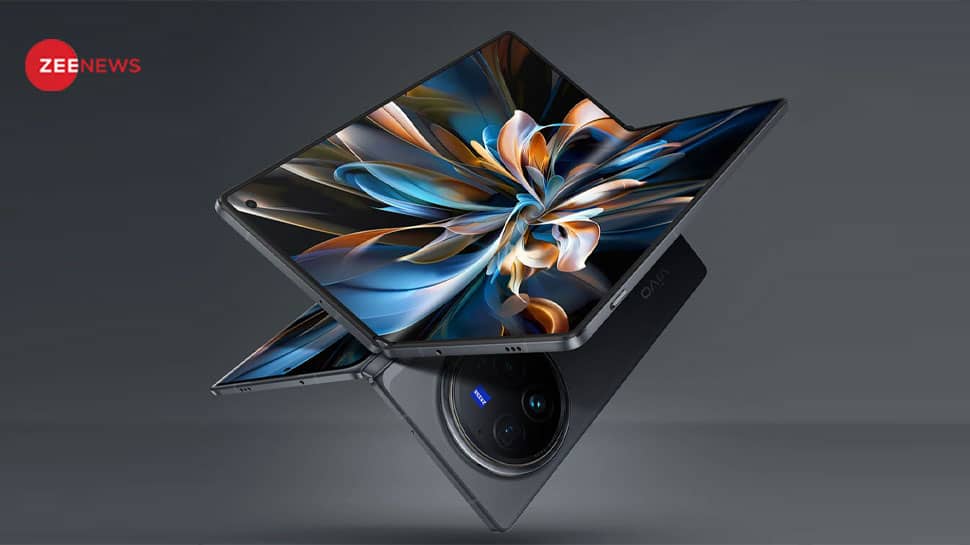
Vivo X Fold 3 Pro Foldable Smartphone Launched In India With Advanced AI Features; Check Price, Specs | Technology News
New Delhi: Vivo has launched its first foldable smartphone in India, the Vivo X Fold 3 Pro. The smartphone is confirmed to be powered by the flagship Snapdragon 8 Gen 3 SoC and paired with a secondary V3 chip. The phone is equipped with integrated artificial intelligence features powered by Google’s Gemini AI models. The company promises that the foldable smartphone to get 3 OS updates and 4 years of security patches. The Vivo X Fold 3 Pro foldable smartphone runs on the Android 14 operating system along with a FunTouch OS custom user interface on top of it. The newly launched smartphone is the thinnest Fold Phone in India at just 11.2mm when closed and 5.2mm when opened. Vivo X Fold 3 Pro Price And Sale Date: The Vivo X Fold 3 Pro foldable smartphone in India starts at Rs 1,59,999 for the sole 16 GB RAM and 512 GB storage variant. The foldable smartphone is now available for pre-booking on Vivo India’s website, Flipkart and Amazon India, and at select retail outlets including Reliance Digital, Croma and Vijay Sales. The sales for the new foldable phone start from June 13. (Also Read: Tecno Camon 30 5G, Camon 30 Premier 5G Get AI Assistant In India; Check Specs, Price) Vivo X Fold 3 Pro Offers: In the Online offers, consumers can enjoy an instant discount of Rs 15,000 on SBI and HDFC cards. There is also no-cost EMI up to 24 months along with a Rs 10,000 additional exchange bonus. The company is also offering free one-time screen replacement for their buyers. In the offline offers, consumers can enjoy a 10% discount on a wider range of bank cards. There is also a free one-time screen replacement and Rs 10,000 trade-in bonus from any older X series phone (V-Upgrade). The company also offers Wireless charger 2.0 worth Rs. 5,999. The charger will be available from June 17 through the Vivo E-store and offline channels. Vivo X Fold 3 Pro Specifications: The foldable smartphone features a 6.53-inch AMOLED LTPO cover display with Dolby Vision and packs an 8.03-inch 2K E7 AMOLED display when unfolded. It is loaded with a 5,700mAh battery with support for 100W wired and 50W wireless charging. In the camera department, the Vivo Fold 3 Pro features a 50 MP primary camera, 50 MP ultra wide-angle camera and 64 MP ZEISS Telephoto camera. For selfies and video chats, the inner and outer screens have 32-megapixel cameras. (Also Read: Realme Narzo N63 Smartphone Launched In India With 50MP AI-Backed Camera; Check Specs, Price) For connectivity, The IPX8-rated smartphone supports 5G, Wi-Fi 7, Bluetooth 5.4, NFC, GPS, NavIC, OTG, and a USB Type-C port.

How do graphic designers convert JPG to PDF (Portable Document Format)?
Most of us are aware of the different file formats these days, such as JPG, PNG, and PDF. The formats mentioned above are most prominently used globally. JPGs can be different things like signatures required to sign documents or screenshots of an instruction manual. When converting JPG to PDF and then sharing it, you want to maintain the quality of the image.It also becomes highly convenient for the end-user to access the PDF file.There are a plethora of tools to convert JPG to PDF. Nonetheless, a tool that has gained a lot of trust in the segment is Adobe Acrobat. It simply converts any file from JPG to PDF without altering the quality. Moving ahead, we will step by step explain how you can use Adobe Acrobat to convert an image to PDF.Basic Definition of JPG and PDFJPG or JPEG stands for Joint Photographic Experts Group, and it is mostly used for compressing highly detailed images, making them smaller for increasing their shareability. They are useful for sharing and storing digital images. The format is mostly used for adding images to blog posts, social media platforms, and emails.As for PDF, it includes a lot of things like images, official documents, degrees, etc. The best part about PDF is that it is a globally used format and can be easily accessed across all devices (being one of the most compatible as well). Another highlight is that it also maintains the quality of images when the size (dimensions) is increased.Why should you convert JPG to PDF? Regarding size, JPG files take less space than PDFs. However, PDF files are easily manageable, and you can also use the other services in Adobe Document Cloud to make sharing, uploading, and managing super easy. PDF will have the upper hand over JPG because the former is easily editable. Any JPG converted to PDF can be divided into different components for editing. However, the case is pretty unidentical when it comes to JPG because you cannot edit any component. When you compress a file in JPG format, it loses quality. On the other hand, PDF files are a little larger than JPG, but you will get high-quality results. How do you convert JPG to PDF on a PC? First, install Adobe Acrobat Reader on your PC; you can even do the same on your browser. Now, select the file you want to convert and wait for it to get processed. After processing, you will see a download button; click on it. Your file will be successfully saved on your PC as a PDF. How do you convert JPG to PDF on a smartphone? Open the Google Play Store and install the Adobe Acrobat application. Now, launch the application and make a sign-in using any of the mentioned methods. Choose a plan – You can also opt for the free plan if you prefer. Apart from that, the subscription can be purchased at minimal prices. Tap on the plus button and the right bottom of the screen and then tap on the open file. Give the application storage access to get your files for editing. Select the file you want to convert. Now, you will see the ‘Convert PDF’ button under the image; tap on it. Your image will be successfully converted to PDF. Note: On the smartphone version, you cannot use the Image to PDF convert feature for free.Frequently asked questionsCan you convert JPG to PDF for free?Yes, there are multiple online and offline tools that can be used to convert any image to PDF without spending a single dime.How to convert JPG into editable PDF?There are not many tools available in the market that offer accurate PDF editing features such as Adobe Acrobat. You can simply upload any file to Adobe Acrobat, edit it the way you want to and click on the “Correct Suspect” icon to make the changes.How to convert JPG to PDF on a smartphone for free?To do it for free, open any browser on your smartphone, then head to the JPG to PDF tool of your liking, and finally upload the file. In most cases, the image will automatically be converted to PDF. In a few of them, you will be required to tap the command button for the conversion. Disclaimer: Content Produced by NP Digital India

Get Free Wi-Fi While Travelling In India; Check This Government Scheme, Benefits, Steps To Avail Facility | Technology News
New Delhi: The Prime Minister Wi-Fi Access Network Interface (PM-WANI) scheme, initiated by the government, aims to provide free Wi-Fi facilities at public places across the country. The objective of this scheme is to ensure internet access to every citizen of the country while travelling, thereby advancing the Digital India mission. The PM-WANI scheme has helped people all over the country get internet access, which is helping India’s Digital India plan a lot. Benefits of the PM-WANI scheme: High Speed: The PM-WANI scheme provides high-speed internet, which enables you to enjoy uninterrupted web browsing, video streaming, and online gaming. Free Internet: Under this scheme, you can use free Wi-Fi at various public places such as railway stations, bus stands, metro stations, hospitals, educational institutions, parks, and government offices. Security: The PM-WANI scheme provides a secure Wi-Fi network, which helps to keep your data safe. Convenience: Using the PM-WANI scheme is very easy. You just need to select the “PM-WANI” Wi-Fi network on your smartphone or laptop and then enter an OTP for authentication. How To Use Free Wi-Fi Under PM-WANI scheme: Step 1: Open Wi-Fi settings on your smartphone or laptop. Step 2: Select the “PM-WANI” Wi-Fi network. Step 3: You will receive an OTP, which you need to enter for authentication. Step 4: Once you give consent, you can start using free Wi-Fi. If you want to access more information about the PM-WANI scheme then you can visit the official website of the PM-WANI scheme at https://pmwani.gov.in/. Moreover, you can also call 1800-266-6666 to grab the required information about the PM-WANI scheme. (Also Read: What Is ‘iPhone Finger’? Is Your Smartphone Changing Your Body? Here’s Everything You Need To Know) The PM-WANI scheme is playing a crucial role in promoting digital inclusion in India. This scheme provides citizens with affordable and easy access to the Internet, helping them connect with education, employment, and other socio-economic opportunities. (Note: The story is articulated by Vineet Singh)
Twitter bans over 5 lakh accounts in India, here’s why
Elon Musk’s social media platform, X (formerly Twitter), has banned over 5 lakh accounts in India. Reuters has reported that these accounts were banned for violating several policies set by social media platforms and these accounts have been banned between January 26 and February 25. Total X accounts banned in FebruaryAccording to the report, the social media platform has banned 5,06,173 accounts for promoting child sexual exploitation and non-consensual nudity.In addition to this, the platform suspended 1,982 accounts for promoting terrorism. Combining both, X has banned a total of 5,08,155 accounts during the said period in India. Also, the platform has received around 14,421 complaints from Indian users through its grievance redressal mechanisms. Moreover, around 41 requests have been raised regarding account suspensions. The company mentioned in its “We overturned 1 of these account suspensions after reviewing the specifics of the situation. The remaining reported accounts remain suspended,” said the company.“We received 71 requests related to general questions about accounts during this reporting period,” it added.This is not a new practice for X to ban accounts for violating the policy. Between December 26 and January 25, the platform banned around 2,31, 215 accounts in India. In the same period, the company banned 1,945 accounts for promoting terrorism on its platform. Tips to prevent X account from getting bannedTo prevent X from taking down your account, avoid violating the policies set by the platform. Prevent posting from child sexual exploitation and non-consensual nudity.
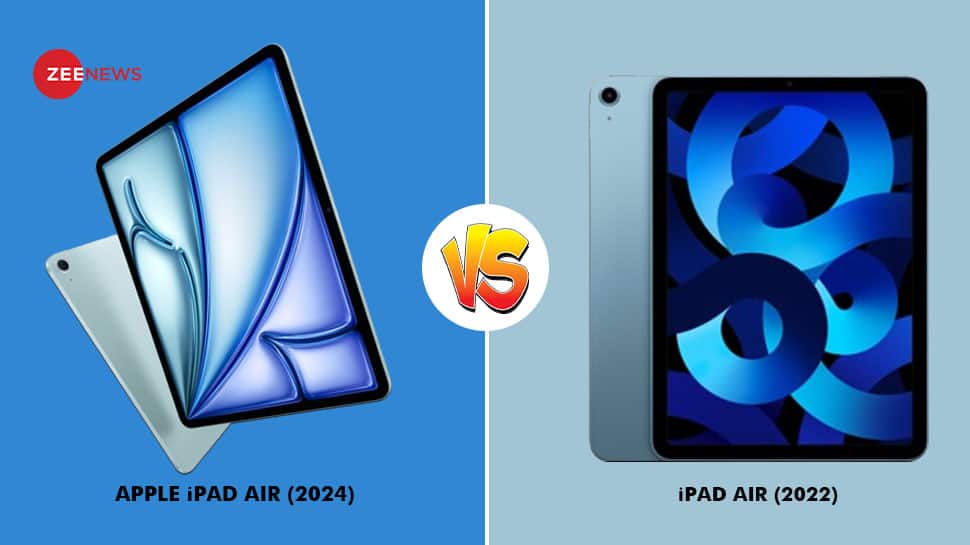
Tech Showdown: iPad Air 6th Gen (2024) Vs iPad Air 5th Gen (2022); Is the Rs 5,000 Increment Worth It? | Technology News
New Delhi: In the fast-paced realm of technology, Apple has launched its latest iPad Air (2024) at the company’s special event. The Apple iPad Air 6th Generation is offered in two sizes: 11-inch and 13-inch, supporting the new Apple Pencil Pro and Magic Keyboard. The newly launched device is available in Space Gray, Starlight, Purple, and Blue colour options. After rolling out the premium gadget, it sparks curiosity among consumers. This is because tech enthusiasts have started comparing it to its predecessor, the iPad Air (2022) model. It was launched in Blue, Space Grey, Pink, Purple, and Starlight colour options. Apple’s iPad Air is now available for order through the Apple Store app in 29 countries and regions, including India. Customers can expect their orders to be shipped directly to them, and the iPad Air will also be stocked in Apple Store locations and Apple Authorized Resellers, starting May 15th. From enhanced capabilities to improved user experience, let’s delve into the specifications of iPads launched in different years. iPad Air 6th Gen And iPad Air 5th Gen Price And Launch Date: The 6th Generation Apple iPad Air (2024) launched on May 7 this year. It launched with a price tag of Rs 59,900. With the launch, the device succeeds the 5th Generation Apple iPad Air, launched on March 18, 2022, at Rs 54,900. Hence, it’s a Rs 5,000 Rs hike in the product. (Also Read: Realme GT Neo 6 Smartphone With Android 14 And Dual Microphones Launched; Check Price, Specs) iPad Air 6th Gen (2024): The new Apple iPad Air lineup offers two screen sizes: 11-inch and 13-inch, with impressive display resolutions of 2360 x 1640 pixels and 2732 x 204 pixels, respectively. Both models feature Retina True Tone technology. These iPads are loaded with the Apple M2 chip, boasting an 8-core CPU, 10-core GPU, and a 16-core Neural Engine. With options for 8GB RAM and storage capacities ranging from 128GB to 1TB, users can customize their device as per their needs. It runs on iPadOS 17. The device sports 12MP rear and front cameras. And with battery capacities of 28.93 watt-hours for the 11-inch model and 36.59 watt-hours for the 13-inch version, enjoy extended usage times of up to 10 hours, or 9 hours with 5G connectivity. It has eSIM only. For connectivity, it supports 5G (optional), Wi-Fi 6E, Bluetooth 5.3, Thunderbolt 3, USB 4, and GPS/GNSS. iPad Air 5th Gen (2022): The tablet features a 10.9-inch vibrant display with a resolution of 2360 x 1640 pixels. It sports Retina True Tone technology for lifelike visuals. The device is powered by the Apple M1 chip, offering an 8-core CPU and 8-core GPU for seamless performance. (Also Read: It runs on iPadOS 15 and has 12 MP rear and front cameras. With a 28.6 watt-hour battery, enjoy up to 10 hours of usage, or 9 hours with 5G connectivity. However, the storage option ranges from 64GB to 256 GB. The tablet comes with a 28.6-watt-hour battery and enjoys up to 10 hours of usage or 9 hours with 5G connectivity. Note: Disclaimer: This comparison helps people choose tablets wisely. It doesn’t favour any brand or model, just gives facts to help consumers understand their options better.
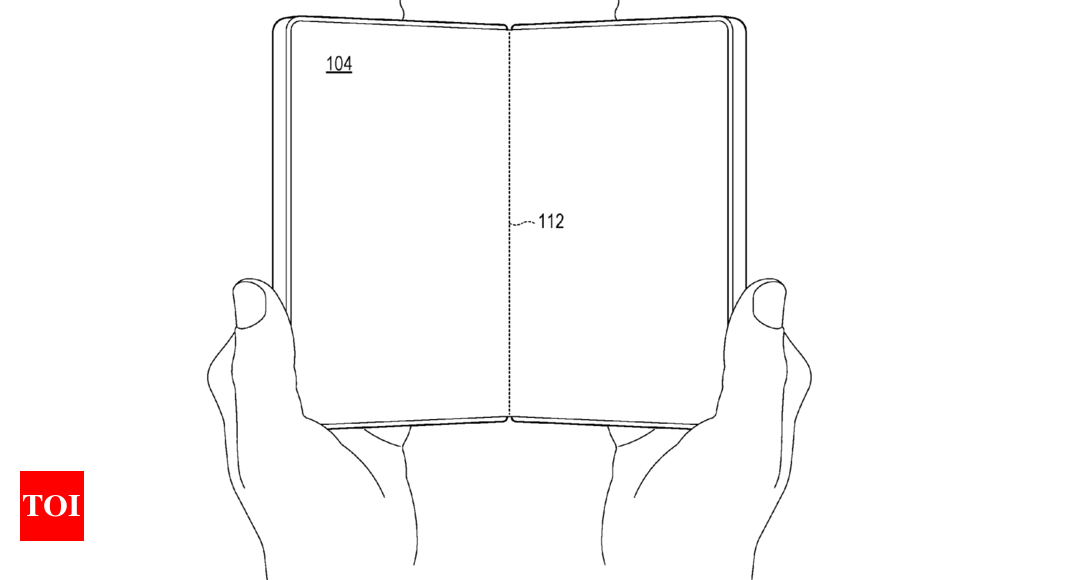
Microsoft plans to take on iPhone and Android smartphones with this new device
Microsoft did not get the success it was anticipating with its Android-powered Surface Duo-series smartphones. The company has discontinued the lineup after the Duo 2. But, this does not mean the company has stopped trying. A new patent application filed with the United States Patent and Trademark Office on February 29, reveals that the company is working on another foldable or dual-display mobile device.The patent application describes the company’s take on the foldable smartphone concept with single hinge technology called “spine cover plate”.Next Microsoft smartphones could feature a Galaxy Z Fold-like designAccording to the patent application, the phone could feature a “flexible display” in a bookstyle design similar to Galaxy Z Fold decies. However, the entire focus is on the spine cover plate mechanism which is aimed at protecting the single-hinge system of the device by covering the structural element. The differentiating factor between the regular hinge and Microsoft’s design is that the spine cover adjusts automatically during the opening and closing of the phone to prevent any unnecessary gaps around the hinge to protect it from dust as well as water. Currently, Samsung’s design offers an IPX8 rating which makes their foldables water-resistant only.The patent further mentions that the new hinge mechanism could allow Microsoft to eliminate the hinge crease less visible than the current options available in the market. Moreover, Microsoft has also mentioned techniques that could allow them to reduce the overall thickness of the foldable smartphone by allowing the spine cover plate to move closer to the device’s hinge when folded. “By retracting the spine cover plate toward the central spine as the first display-supporting frame and the second display-supporting frame are rotated into a face-to-face orientation, the width of the folded computing device is reduced, thereby enabling easier and more comfortable handling of the device, such as with one hand,” Microsoft noted in the patent.Interesting idea, but practicality is a question markThe entire smartphone market is searching for a way to eliminate the foldable crease from their smartphones. Some brands have already implemented the water-drop folding mechanism to reduce it, but there’s nothing like a crease-free foldable out there. Apart from that, the durability quotient of foldable is also important considering all the movable parts these phones have. That said, adding another layer or a movable part on top of the entire foldable mechanism does not appear like a wise move despite the added benefits and durability Microsoft has explained in the patent application.

DoT Blocks 20 Mobile Handsets For Misuse In Cybercrime, Financial Fraud
In March, the telecom department issued an advisory to citizens about calls impersonating DoT, threatening people to disconnect their mobile numbers.

ChatGPT was down globally, here’s what the company has to say
ChatGPT went through an outage. The outage tracking website — Downdetector — has also received reports from several users suggesting that they are unable to access the OpenAI’s chatbot. According to the report, around 91% of people are faced issues while accessing ChatGPT. Around 7% of users were unable to access the website and the rest were unable to log into their ChatGPT account.Users also took to X (formerly Twitter) to post about the ongoing outage. What OpenAI has to sayWhile users were facing issues while accessing the ChatGPT, OpenAI’s official status page also acknowledged the outage. The company has mentioned the issue as “increased latency and errors affecting both ChatGPT and APIs. Also, the service is now back online, as per the official OpenAI Status page and the latency issue has been fixed. “Performance is now back to normal”, reads the official page. To verify this, TOI Tech team also tried accessing ChatGPT on the web as well as via the mobile app and in both places, ChatGPT appears to be working fine without any issues.
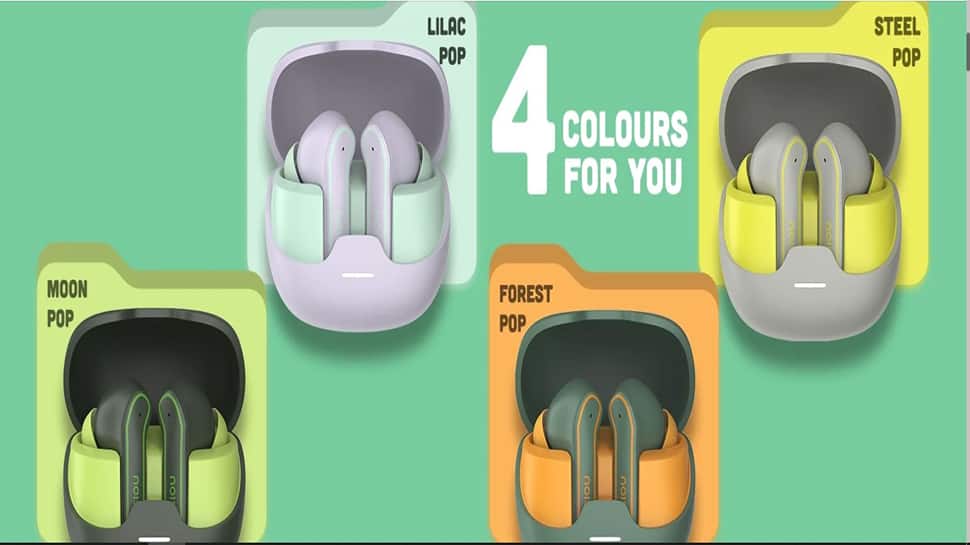
Noise Pop Buds TWS Earbuds Launched In India With Instacharge Feature; Check Price, Specs
Consumers can buy the Noise Pop Buds wireless TWS earbuds via Flipkart and the Noise India website.