

5 Agentic Coding Tips & TricksImage by Editor Introduction Agentic coding only feels “smart” when it ships correct diffs, passes tests, and leaves a paper trail you can trust. The fastest way to get there is to stop asking an agent to “build a feature” and start giving it a workflow it cannot escape. That workflow should force clarity (what changes), evidence (what passed), and containment (what it can touch). The tips below are concrete patterns you can drop into daily work with code agents, whether you are using a CLI agent, an IDE assistant, or a custom tool-using model. 1. Use A Repo Map To Prevent Blind Refactors Agents get generic when they do not understand the topology of your codebase. They default to broad refactors because they cannot reliably locate the right seams. Give the agent a repo map that is short, opinionated, and anchored in the parts that matter. Create a machine-readable snapshot of your project structure and key entry points. Keep it under a few hundred lines. Update it when major folders change. Then feed the map into the agent before any coding. Here’s a simple generator you can keep in tools/repo_map.py: from pathlib import Path INCLUDE_EXT = {“.py”, “.ts”, “.tsx”, “.go”, “.java”, “.rs”} SKIP_DIRS = {“node_modules”, “.git”, “dist”, “build”, “__pycache__”} root = Path(__file__).resolve().parents[1] lines = [] for p in sorted(root.rglob(“*”)): if any(part in SKIP_DIRS for part in p.parts): continue if p.is_file() and p.suffix in INCLUDE_EXT: rel = p.relative_to(root) lines.append(str(rel)) print(“\n”.join(lines[:600])) from pathlib import Path INCLUDE_EXT = {“.py”, “.ts”, “.tsx”, “.go”, “.java”, “.rs”} SKIP_DIRS = {“node_modules”, “.git”, “dist”, “build”, “__pycache__”} root = Path(__file__).resolve().parents[1] lines = [] for p in sorted(root.rglob(“*”)): if any(part in SKIP_DIRS for part in p.parts): continue if p.is_file() and p.suffix in INCLUDE_EXT: rel = p.relative_to(root) lines.append(str(rel)) print(“\n”.join(lines[:600])) Add a second section that names the real “hot” files, not everything. Example: Entry Points: api/server.ts (HTTP routing) core/agent.ts (planning + tool calls) core/executor.ts (command runner) packages/ui/App.tsx (frontend shell) Key Conventions: Never edit generated files in dist/ All DB writes go through db/index.ts Feature flags live in config/flags.ts This reduces the agent’s search space and stops it from “helpfully” rewriting half the repository because it got lost. 2. Force Patch-First Edits With A Diff Budget Agents derail when they edit like a human with unlimited time. Force them to behave like a disciplined contributor: propose a patch, keep it small, and explain the intent. A practical trick is a diff budget, an explicit limit on lines changed per iteration. Use a workflow like this: Agent produces a plan and a file list Agent produces a unified diff only You apply the patch Tests run Next patch only if needed If you are building your own agent loop, make sure to enforce it mechanically. Example pseudo-logic: MAX_CHANGED_LINES = 120 def count_changed_lines(unified_diff: str) -> int: return sum(1 for line in unified_diff.splitlines() if line.startswith((“+”, “-“)) and not line.startswith((“+++”, “—“))) changed = count_changed_lines(diff) if changed > MAX_CHANGED_LINES: raise ValueError(f”Diff too large: {changed} changed lines”) MAX_CHANGED_LINES = 120 def count_changed_lines(unified_diff: str) -> int: return sum(1 for line in unified_diff.splitlines() if line.startswith((“+”, “-“)) and not line.startswith((“+++”, “—“))) changed = count_changed_lines(diff) if changed > MAX_CHANGED_LINES: raise ValueError(f“Diff too large: {changed} changed lines”) For manual workflows, bake the constraint into your prompt: Output only a unified diff Hard limit: 120 changed lines total No unrelated formatting or refactors If you need more, stop and ask for a second patch Agents respond well to constraints that are measurable. “Keep it minimal” is vague. “120 changed lines” is enforceable. 3. Convert Requirements Into Executable Acceptance Tests Vague requests can prevent an agent from properly editing your spreadsheet, let alone coming up with proper code. The fastest way to make an agent concrete, regardless of its design pattern, is to translate requirements into tests before implementation. Treat tests as a contract the agent must satisfy, not a best-effort add-on. A lightweight pattern: Write a failing test that captures the feature behavior Run the test to confirm it fails for the right reason Let the agent implement until the test passes Example in Python (pytest) for a rate limiter: import time from myapp.ratelimit import SlidingWindowLimiter def test_allows_n_requests_per_window(): lim = SlidingWindowLimiter(limit=3, window_seconds=1) assert lim.allow(“u1”) assert lim.allow(“u1”) assert lim.allow(“u1”) assert not lim.allow(“u1”) time.sleep(1.05) assert lim.allow(“u1”) import time from myapp.ratelimit import SlidingWindowLimiter def test_allows_n_requests_per_window(): lim = SlidingWindowLimiter(limit=3, window_seconds=1) assert lim.allow(“u1”) assert lim.allow(“u1”) assert lim.allow(“u1”) assert not lim.allow(“u1”) time.sleep(1.05) assert lim.allow(“u1”) Now the agent has a target that is objective. If it “thinks” it is done, the test decides. Combine this with tool feedback: the agent must run the test suite and paste the command output. That one requirement kills an entire class of confident-but-wrong completions. Prompt snippet that works well: Step 1: Write or refine tests Step 2: Run tests Step 3: Implement until tests pass Always include the exact commands you ran and the final test summary. If tests fail, explain the failure in one paragraph, then patch. 4. Add A “Rubber Duck” Step To Catch Hidden Assumptions Agents make silent assumptions about data shapes, time zones, error handling, and concurrency. You can surface those assumptions with a forced “rubber duck” moment, right before coding. Ask for three things, in order: Assumptions the agent is making What could break those assumptions? How will we validate them? Keep it short and mandatory. Example: Before coding: list 5 assumptions For each: one validation step using existing code or logs If any assumption cannot be validated, ask one clarification question and stop This creates a pause that often prevents bad architectural commits. It also gives you an easy review checkpoint. If you disagree with an assumption, you can correct it before the agent writes code that bakes it in. A common win is catching data contract mismatches early. Example: the agent assumes a timestamp is ISO-8601, but the API returns epoch milliseconds. That one mismatch can cascade into “bugfix” churn. The rubber duck step flushes it out. 5.

Realme Pad 3 5G Confirmed: Massive 12,200mAh Battery, 2.8K Display & More – Launching On… | Technology News
Realme Pad 3 5G: Realme has confirmed that the Pad 3 5G tablet will launch in India alongside the upcoming Realme 16 Pro series. The tablet is already listed on the company’s website. This reveals key details about its battery, display and design. The new model will replace the Realme Pad 2, which was launched in July 2023. The Realme Pad 3 5G will come with a much bigger battery than its predecessor. Additionally, it will offer a higher-resolution display than the Pad 2, which features an 11.5-inch 2K screen. The microsite for the Realme 16 Pro series now confirms that the Realme Pad 3 5G will be unveiled at the same event. The launch is scheduled for January 6, 2026, at 12 pm IST. The tablet has also appeared on the Realme India online store. This confirms that it will be sold through the platform and hints at a few core features. Realme has confirmed that the Pad 3 5G will pack a 12,200mAh Titan Battery. It will feature a Book-View Display with slim bezels and a 2.8K resolution. The tablet will sport a dual rear camera setup with an LED flash. The cameras sit inside a square-shaped module. Realme branding is placed at the centre of the back panel. The tablet will be available in at least black and gold colour options. More details are expected to be revealed soon. Add Zee News as a Preferred Source Rumors suggest that the Realme Pad 3 5G is likely to be powered by a MediaTek Dimensity 7300-Max chipset. It might run on Android 16-based Realme UI 7.0. The tablet will reportedly be just 6.6mm thick. The display could support a 120Hz refresh rate, 296ppi pixel density and 1.07 billion colours. The Realme Pad 3 5G will succeed the Realme Pad 2, which features an 11.5-inch 2K display with up to a 120Hz refresh rate. It offers 450 nits of peak brightness and an 85.2 percent screen-to-body ratio. The Pad 2 is powered by a MediaTek Helio G99 chip and offers up to 8GB RAM and 256GB storage. It packs an 8,360mAh battery with 33W fast charging support.

OnePlus Likely To Launch New Turbo Model With 9000mAh Battery; Check Leaked Display, Chipset, Camera, Price And Other Specs | Technology News
OnePlus Smartphone With 9000mAh Battery: OnePlus has already launched the OnePlus 15 and OnePlus 15R in the Indian market. Soon after the launch, the company started working on a new smartphone, which is expected to be its first Turbo model. According to reports, Chinese smartphone maker OnePlus is developing a device that could come with a massive 9,000mAh battery. This upcoming phone is likely to be positioned below the flagship OnePlus 15 series in the company’s lineup. A report by Android Authority reveals that the device is internally codenamed “Volkswagen” and is expected to be powered by Qualcomm’s Snapdragon 8s Gen 4 processor. It is rumoured that the smartphone could launch either as the OnePlus Nord 6 or as the OnePlus Turbo, with the latter expected to debut in China as early as next month. Add Zee News as a Preferred Source OnePlus Smartphone With 9000mAh Battery: Specifications (Expected) As per leaks, the upcoming smartphone will feature a 6-inch OLED display with a 165Hz refresh rate, similar to the flagship OnePlus 15 series. The display is expected to use LTPS technology, like the OnePlus 15R, allowing it to switch between fixed refresh rates instead of the more advanced LTPO panel. The OnePlus is tipped to be powered by the Snapdragon 8s Gen 4 chipset, paired with up to 12GB RAM. It is also said to pack a massive 9,000mAh battery with 80W fast charging support. (Also Read: Oppo Reno 15 Pro Mini, Reno 15 Pro, Reno 15 Likely To Launch In January 2026; Check Expected Specs, And Price) On the photography front, the phone is likely to sport a dual rear camera setup, similar to the recently launched OnePlus 15R. Adding further, the report claims that the anticipated OnePlus Turbo model has already surfaced on Geekbench with the model number PLU110, confirming the same chipset and battery capacity. OnePlus Smartphone With 9000mAh Battery: Price (Expected) Since it will be positioned below the OnePlus 15R, the upcoming OnePlus smartphone is expected to be priced competitively. Reports suggest it could launch in India at around Rs 35,000, making it a more affordable option in OnePlus’s premium lineup.
Prompt Engineering for Time Series Analysis
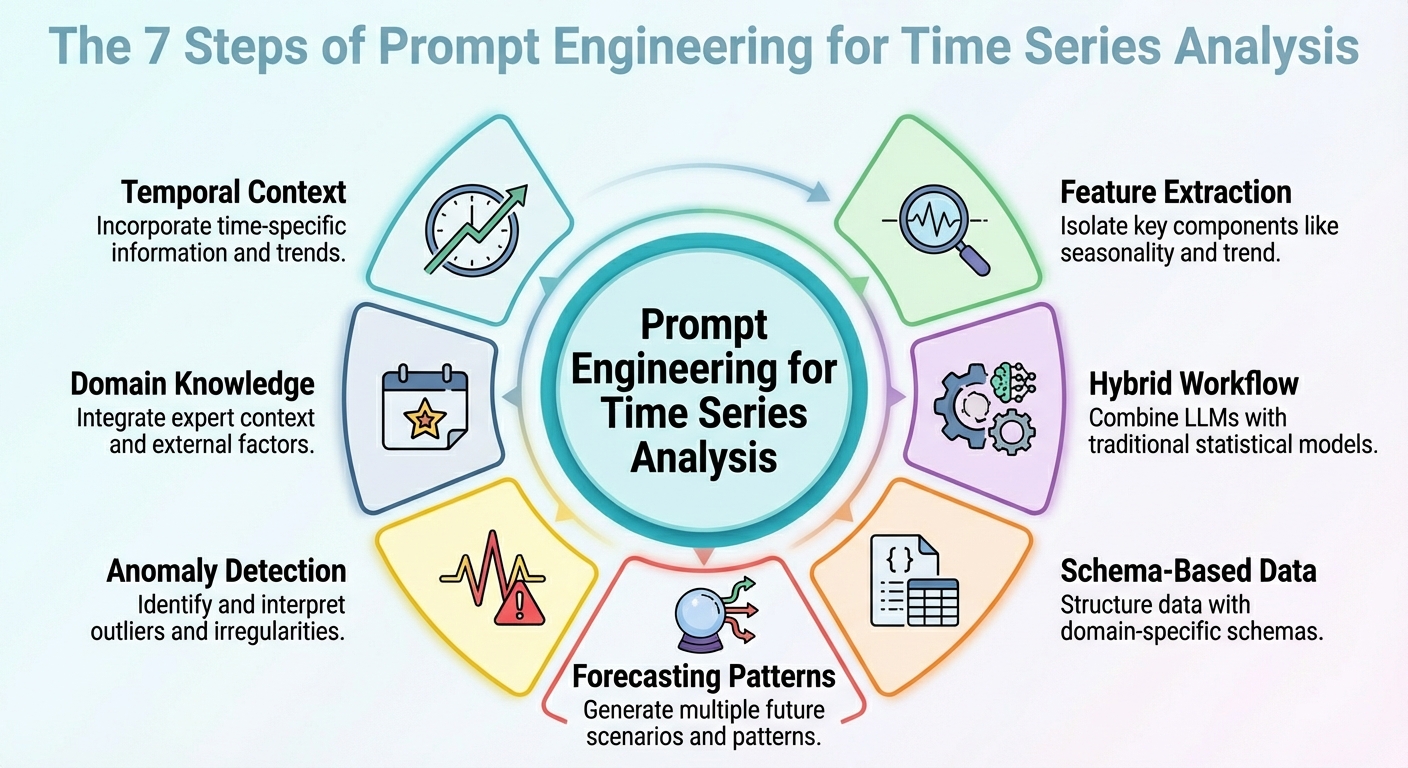
In this article, you will learn practical prompt-engineering patterns that make large language models useful and reliable for time series analysis and forecasting. Topics we will cover include: How to frame temporal context and extract useful signals How to combine LLM reasoning with classical statistical models How to structure data and prompts for forecasting, anomalies, and domain constraints Without further delay, let’s begin. Prompt Engineering for Time Series AnalysisImage by Editor Introduction Strange as it may sound, large language models (LLMs) can be leveraged for data analysis tasks, including specific scenarios such as time series analysis. The key is to correctly translate your prompt engineering skills into the specific analysis scenario. This article outlines seven prompt engineering strategies that can be used to leverage time series analysis tasks with LLMs. Unless said otherwise, the descriptions of these strategies are accompanied by illustrative examples revolving around a retail sales data scenario, concretely, considering a time series dataset consisting of daily sales over time for its analysis. 1. Contextualizing Temporal Structure First, an effective prompt to get a useful model output should be one that helps it understand the temporal structure of the time series dataset. This includes possible mentions of upward/downward trends, seasonality, known cycles like promotions or holidays, and so on. This context information will help your LLM interpret, for instance, temporal fluctuations as — well, just that: fluctuations, rather than noise. In sum, describing the structure of the dataset clearly in the context accompanying your prompts often goes further than intricate reasoning instructions in prompts. Example prompt:“Here is the daily sales (in units) for the last 365 days. The data shows a weekly seasonality (higher sales on weekends), a gradually increasing long-term trend, and monthly spikes at the end of each month due to pay-day promotions. Use that knowledge when forecasting the next 30 days.” 2. Feature and Signal Extraction Instead of asking your model to perform direct forecasts from raw numbers, why not prompt it to extract some key features first? This could include latent patterns, anomalies, and correlations. Asking the LLM to extract features and signals and incorporate them into the prompt (e.g., through summary statistics or decomposition) helps reveal the reasons behind future predictions or fluctuations. Example prompt:“From the past 365 days of sales data, compute the average daily sales, the standard deviation, identify any days where sales exceeded mean plus twice the standard deviation (i.e., potential outliers), and note any recurring weekly or monthly patterns. Then interpret what factors might explain high-sales days or dips, and flag any unusual anomalies.” 3. Hybrid LLM + Statistical Workflow Let’s face it: LLMs in isolation will often struggle with tasks requiring numeric precision and capturing temporal dependencies in time series. For this reason, simply combining their use with classical statistical models is a formula to yield better outcomes. How could a hybrid workflow like this be defined? The trick is to inject LLM reasoning — high-level interpretation, hypothesis formulation, and context comprehension — alongside quantitative models such as ARIMA, ETS, or others. For instance, LeMoLE (LLM-Enhanced Mixture of Linear Experts) is an example of a hybrid approach that enriches linear models with prompt-derived features. The result blends contextual reasoning and statistical rigor: the best of two worlds. 4. Schema-based Data Representation While raw time series datasets are usually poorly suited formats to pass as LLM inputs, using structured schemas like JSON or compact tables could be the key that allows the LLM to interpret these data much more reliably, as demonstrated in several studies. Example JSON snippet to be passed alongside a prompt: { “sales”: [ {“date”: “2024-12-01”, “units”: 120}, {“date”: “2024-12-02”, “units”: 135}, …, {“date”: “2025-11-30”, “units”: 210} ], “metadata”: { “frequency”: “daily”, “seasonality”: [“weekly”, “monthly_end”], “domain”: “retail_sales” } } { “sales”: [ {“date”: “2024-12-01”, “units”: 120}, {“date”: “2024-12-02”, “units”: 135}, …, {“date”: “2025-11-30”, “units”: 210} ], “metadata”: { “frequency”: “daily”, “seasonality”: [“weekly”, “monthly_end”], “domain”: “retail_sales” } } Prompt to accompany the JSON data with:“Given the above JSON data and metadata, analyze the time series and forecast the next 30 days of sales.” 5. Prompted Forecasting Patterns Designing and properly structuring forecasting patterns within the prompt — such as short-term vs. long-term horizons or simulating specific “what-if” scenarios — can help guide the model to produce more usable responses. This approach is effective for generating highly actionable insights for your requested analysis. Example: Task A — Short-term (next 7 days): Forecast expected sales. Task B — Long-term (next 30 days): Provide a baseline forecast plus two scenarios: – Scenario 1 (normal conditions) – Scenario 2 (with a planned promotion on days 10-15) In addition, provide a 95% confidence interval for both scenarios. Task A — Short–term (next 7 days): Forecast expected sales. Task B — Long–term (next 30 days): Provide a baseline forecast plus two scenarios: – Scenario 1 (normal conditions) – Scenario 2 (with a planned promotion on days 10–15) In addition, provide a 95% confidence interval for both scenarios. 6. Anomaly Detection Prompts This one is more task-specific and focuses on properly crafting prompts that may help not only forecast with LLMs but also detect anomalies — in combination with statistical methods — and reason about their likely causes, or even suggest what to investigate. The key is, once more, to first preprocess with traditional time series tools and then prompt the model for interpretation of findings. Example prompt:“Using the sales data JSON, first flag any day where sales deviate more than 2× the weekly standard deviation from the weekly mean. Then for every flagged day, explain possible causes (e.g., out-of-stock, promotion, external events) and recommend whether to investigate (e.g., check inventory logs, marketing campaign, store foot traffic).” 7. Domain-Infused Reasoning Domain knowledge like retail seasonality patterns, holiday effects, etc., uncovers valuable insights, and embedding it into prompts helps LLMs perform analyses and predictions that are more meaningful and also interpretable. This boils down to leveraging the relevance of “dataset
Oppo Reno 15 Pro Mini, Reno 15 Pro, Reno 15 Likely To Launch In January 2026; Check Expected Specs, And Price | Technology News
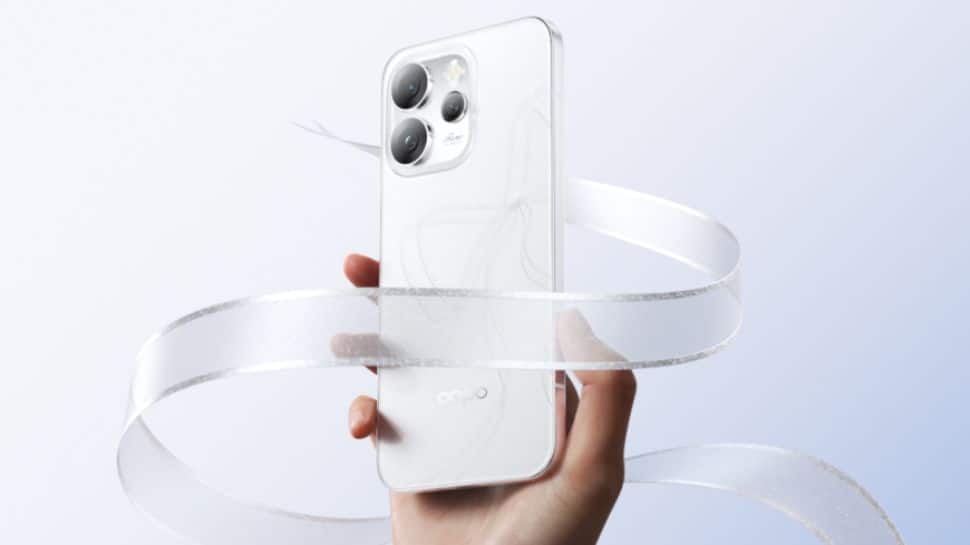
Oppo Reno 15 Series India Launch: Chinese smartphone brand Oppo has confirmed the launch of the Oppo Reno 15 series in India. The lineup will include three models, the Oppo Reno 15, Oppo Reno 15 Pro, and Oppo Reno 15 Pro Mini. Oppo has revealed that the series is designed using its new HoloFusion Technology. A dedicated microsite for the upcoming smartphones is already live on an e-commerce platform. While all three models feature a similar design, they differ in internal specifications. Notably, the Reno 15 series will offer top-tier water and dust resistance with IP66, IP68, and IP69 ratings. The Oppo Reno 15 series is expected to come in Glacier White, Twilight Blue, and Aurora Blue colour options. Oppo Reno 15 Series Specifications (Expected) Add Zee News as a Preferred Source The Oppo Reno 15 Pro Mini is expected to feature a 6.32-inch AMOLED display with ultra-slim 1.6mm bezels, offering a 93.35 percent screen-to-body ratio. It is tipped to weigh around 187g and measure about 7.99mm in thickness. Meanwhile, the Oppo Reno 15 Pro is likely to sport a larger 6.78-inch AMOLED panel protected by Gorilla Glass Victus 2, while the standard Reno 15 is expected to feature a 6.59-inch AMOLED display. All three smartphones are said to support Full HD+ resolution with a 120Hz refresh rate. In terms of brightness, the Pro and Pro Mini models are expected to reach up to 3,600 nits of peak brightness, while the regular Reno 15 may offer up to 1,200 nits. Adding further, even the USB Type-C port is tipped to come with a platinum coating to help resist corrosion. (Also Read: Samsung Galaxy S24 Ultra Gets Price Cut On THIS Platform; Check Camera, Battery, Display And Other Specs) Oppo Reno 15 Series Price In India (Expected) Flipkart has already published a dedicated teaser page for the lineup, confirming online availability. However, The company hasn’t shared the official launch date yet. It is rumoured that the Oppo Reno 15 lineup is expected to launch in the first week of the January 2026. As for pricing, we expect the Reno 15 Pro Mini to start around Rs 39,999, the Reno 15 around Rs 44,999, and the Reno 15 Pro at roughly Rs 56,999.

Truecaller’s Game Over? CNAP Will Show Caller Name Automatically On Your Phone; Check Key Differences And How To Check Activation | Technology News
CNAP Vs Truecaller In India: The Telecom Regulatory Authority of India (TRAI) has begun rolling out Calling Name Presentation, or CNAP, a feature that shows the real name of the caller on your phone screen before you answer the call. The name displayed is the one linked to the caller’s Aadhaar card, not a name saved by users or apps. The service has started rolling out in several telecom circles across India after the Telecom Regulatory Authority of India (TRAI) recommended its implementation earlier this year. CNAP In India: How It Works CNAP is a network-based service, not an app. This means users do not need to download anything or manually activate the feature. Once enabled by the telecom operator, it works automatically. In the first phase, CNAP has been launched on 4G and 5G networks. It will be extended to 2G networks in the coming months. The service is currently free of cost for users. Add Zee News as a Preferred Source CNAP In India: Which Telecom Operators Supports This Service Reliance Jio, Airtel, and Vodafone Idea have started rolling out the CNAP service in select telecom circles across India. Reliance Jio has enabled CNAP in Kerala, Bihar, Rajasthan, Punjab, Assam, Uttarakhand, West Bengal, Jharkhand, Odisha, UP East and West, and Himachal Pradesh. Airtel has activated the service in Gujarat, Madhya Pradesh, Maharashtra, Jammu And Kashmir, and West Bengal, while Vodafone Idea users can access CNAP in parts of Maharashtra and Tamil Nadu. The rollout is being carried out in phases, with more circles expected to be added in the coming weeks. How To Check CNAP Activation On Your Mobile Number To check CNAP status, dial *#31# from your phone’s dial pad. If the caller ID is shown as not restricted, it indicates that CNAP is active on the network. CNAP works only for incoming calls. When making outgoing calls, users will not see the recipient’s name, but their own registered name will be visible to the receiver. CNAP Vs Truecaller: Key Differences CNAP uses Aadhaar-linked telecom records as its data source, which means the caller name shown is based on official SIM registration details. It does not require any app and the displayed name cannot be edited by users. CNAP is a network-based service and currently does not provide spam alerts. On the other hand, the Truecaller relies on user-saved contacts for its data, requires an app to function, allows users to edit or remove their names, and offers spam call alerts, but it is not a network-based service. CNAP In India: Will This Service Stop Spam Calls? CNAP alone will not completely eliminate spam calls. While it shows the caller’s name, it does not flag calls as spam. Users still need to answer calls and manually block unwanted numbers. Telecom operators like Jio and Airtel currently offer separate spam detection services, which work alongside CNAP. CNAP In India: Can Users Opt Out From This Service? There are reports that users may be allowed to opt out by contacting their telecom operator or by using specific dial codes. However, telecom companies have not officially confirmed a universal opt-out option yet. CNAP in India: Why It Is Crucial For Users? CNAP helps users identify callers by showing verified names, reducing the need for third-party caller ID apps. However, the service is still limited, as issues like cross-network support and the lack of built-in spam alerts need to be resolved.
3 Feature Engineering Techniques for Unstructured Text Data
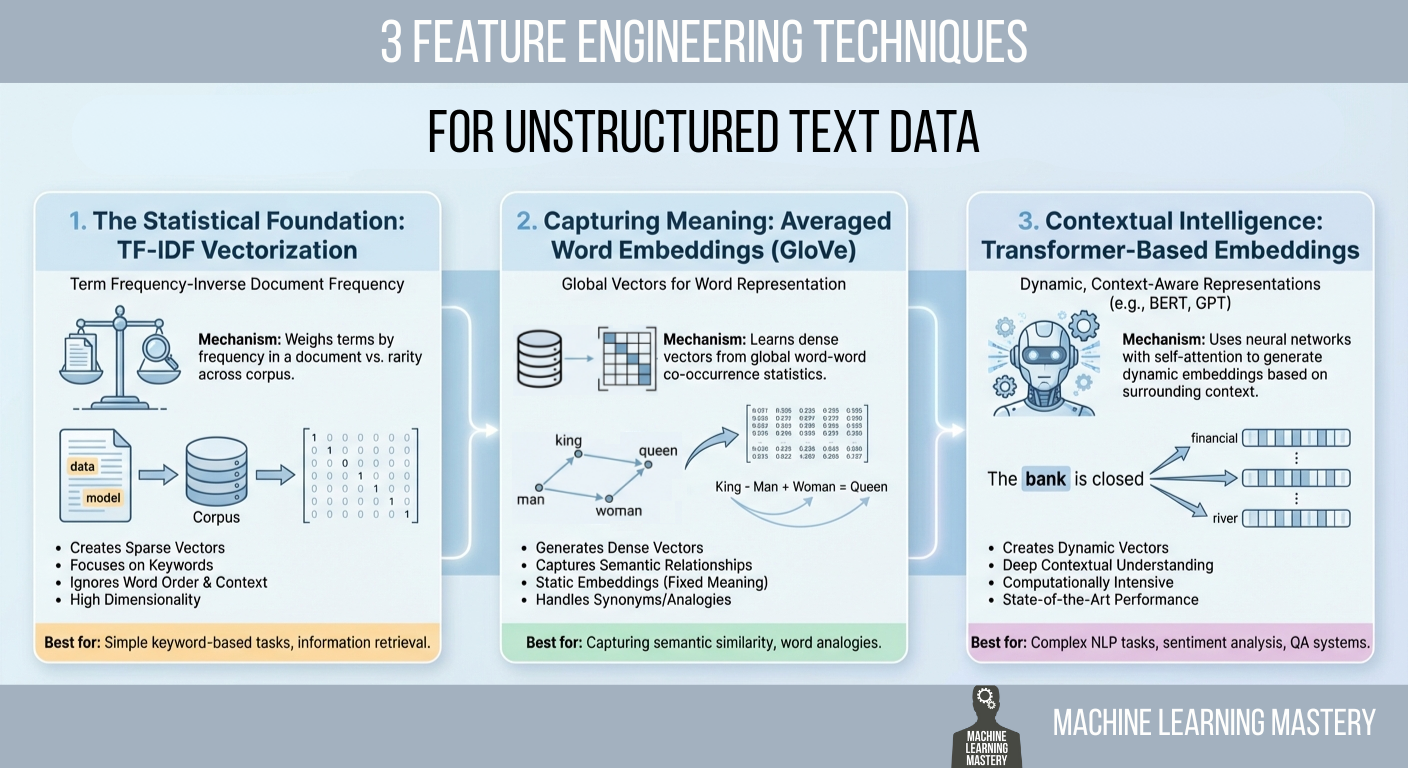
In this article, you will learn practical ways to convert raw text into numerical features that machine learning models can use, ranging from statistical counts to semantic and contextual embeddings. Topics we will cover include: Why TF-IDF remains a strong statistical baseline and how to implement it. How averaged GloVe word embeddings capture meaning beyond keywords. How transformer-based embeddings provide context-aware representations. Let’s get right into it. 3 Feature Engineering Techniques for Unstructured Text DataImage by Editor Introduction Machine learning models possess a fundamental limitation that often frustrates newcomers to natural language processing (NLP): they cannot read. If you feed a raw email, a customer review, or a legal contract into a logistic regression or a neural network, the process will fail immediately. Algorithms are mathematical functions that operate on equations, and they require numerical input to function. They do not understand words; they understand vectors. Feature engineering for text is a crucial process that bridges this gap. It is the act of translating the qualitative nuances of human language into quantitative lists of numbers that a machine can process. This translation layer is often the decisive factor in a model’s success. A sophisticated algorithm fed with poorly engineered features will perform worse than a simple algorithm fed with rich, representative features. The field has undergone significant evolution over the past few decades. It has evolved from simple counting mechanisms that treat documents as bags of unrelated words to complex deep learning architectures that understand the context of a word based on its surrounding words. This article covers three distinct approaches to this problem, ranging from the statistical foundations of TF-IDF to the semantic averaging of GloVe vectors, and finally to the state-of-the-art contextual embeddings provided by transformers. 1. The Statistical Foundation: TF-IDF Vectorization The most straightforward way to turn text into numbers is to count them. This was the standard for decades. You can simply count the number of times a word appears in a document, a technique known as bag of words. However, raw counts have a significant flaw. In almost any English text, the most frequent words are grammatically necessary but semantically empty articles and prepositions like “the,” “is,” “and,” or “of.” If you rely on raw counts, these common words will dominate your data, drowning out the rare, specific words that actually give the document its meaning. To solve this, we use term frequency–inverse document frequency (TF-IDF). This technique weighs words not just by how often they appear in a specific document, but by how rare they are across the entire dataset. It is a statistical balancing act designed to penalize common words and reward unique ones. The first part, term frequency (TF), measures how frequently a term occurs in a document. The second part, inverse document frequency (IDF), measures the importance of a term. The IDF score is calculated by taking the logarithm of the total number of documents divided by the number of documents that contain the specific term. If the word “data” appears in every single document in your dataset, its IDF score approaches zero, effectively cancelling it out. Conversely, if the word “hallucination” appears in only one document, its IDF score is very high. When you multiply TF by IDF, the result is a feature vector that highlights exactly what makes a specific document unique compared to the others. Implementation and Code Explanation We can implement this efficiently using the scikit-learn TfidfVectorizer. In this example, we take a small corpus of three sentences and convert them into a matrix of numbers. from sklearn.feature_extraction.text import TfidfVectorizer import pandas as pd # 1. Define a small corpus of text documents = [ “The quick brown fox jumps.”, “The quick brown fox runs fast.”, “The slow brown dog sleeps.” ] # 2. Initialize the Vectorizer # We limit the features to the top 100 words to keep the vector size manageable vectorizer = TfidfVectorizer(max_features=100) # 3. Fit and Transform the documents tfidf_matrix = vectorizer.fit_transform(documents) # 4. View the result as a DataFrame for clarity feature_names = vectorizer.get_feature_names_out() df_tfidf = pd.DataFrame(tfidf_matrix.toarray(), columns=feature_names) print(df_tfidf) 1 2 3 4 5 6 7 8 9 10 11 12 13 14 15 16 17 18 19 20 21 22 from sklearn.feature_extraction.text import TfidfVectorizer import pandas as pd # 1. Define a small corpus of text documents = [ “The quick brown fox jumps.”, “The quick brown fox runs fast.”, “The slow brown dog sleeps.” ] # 2. Initialize the Vectorizer # We limit the features to the top 100 words to keep the vector size manageable vectorizer = TfidfVectorizer(max_features=100) # 3. Fit and Transform the documents tfidf_matrix = vectorizer.fit_transform(documents) # 4. View the result as a DataFrame for clarity feature_names = vectorizer.get_feature_names_out() df_tfidf = pd.DataFrame(tfidf_matrix.toarray(), columns=feature_names) print(df_tfidf) The code begins by importing the necessary TfidfVectorizer class. We define a list of strings that serves as our raw data. When we call fit_transform, the vectorizer first learns the vocabulary of the entire list (the “fit” step) and then transforms each document into a vector based on that vocabulary. The output is a Pandas DataFrame, where each row represents a sentence, and each column represents a unique word found in the data. 2. Capturing Meaning: Averaged Word Embeddings (GloVe) While TF-IDF is powerful for keyword matching, it suffers from a lack of semantic understanding. It treats the words “good” and “excellent” as completely unrelated mathematical features because they have different spellings. It does not know that they mean nearly the same thing. To solve this, we move to word embeddings. Word embeddings are a technique where words are mapped to vectors of real numbers. The core idea is that words with similar meanings should have similar mathematical representations. In this vector space, the distance between the vector for “king” and “queen” is roughly similar to the distance between “man” and “woman.” One of the most popular pre-trained embedding sets is GloVe (global vectors for word representation), developed by researchers at
Samsung Galaxy S26 Ultra Gets BIS Battery Certification; Check Expected Camera, Display, Processor, Price And India Launch Date | Technology News
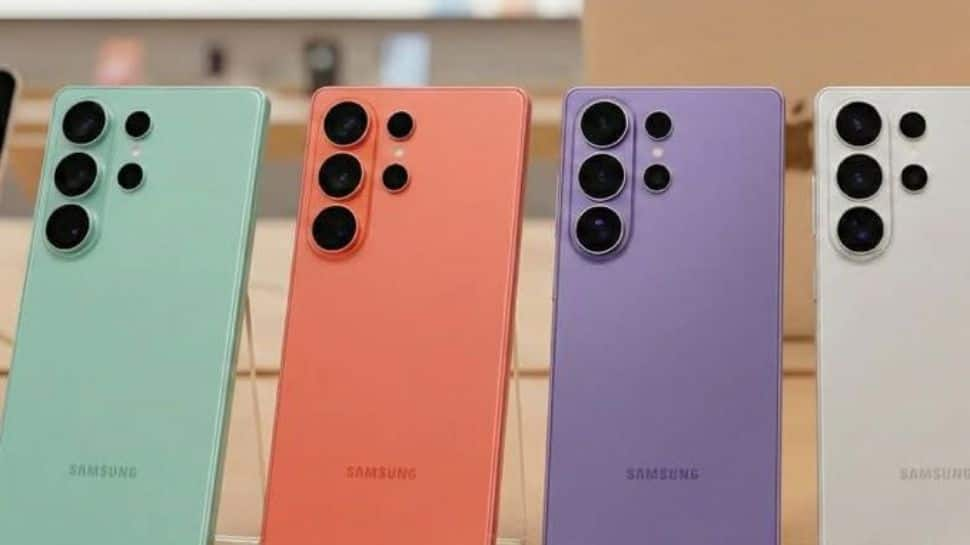
Samsung Galaxy S26 Ultra India Launch: South Korean Giant Samsung has prepared its flagship Galaxy S26 series for the next Galaxy Unpacked event. The Galaxy S26 lineup is set to come with three models which includes the Galaxy S26, Galaxy S26 Plus and the premium Galaxy S26 Ultra. The battery for the Galaxy S26+ has now been certified by India’s Bureau of Indian Standards (BIS). However, the base Galaxy S26 and S26 Ultra have already picked up this battery certification. Adding further, the Bureau of Indian Standards (BIS) has approved battery packs for a Samsung phone with the model number SM-S946. This phone is believed to be the Galaxy S26+. Earlier, BIS had also approved batteries for other Galaxy S26 models, including SM-S942 (Galaxy S26/Pro), SM-S947 (the canceled Galaxy S26 Edge), and SM-S948 (Galaxy S26 Ultra). The certification does not reveal detailed specifications, it confirms that Samsung has begun clearing mandatory approvals ahead of the official launch. The Samsung is likely to ship the phone with One UI 8.5 based on Android 16 right out of the box. The Galaxy S26 Ultra is expected to carry forward the boxy look of the S25 Ultra. Add Zee News as a Preferred Source Samsung Galaxy S26 Ultra Specifications (Expected) The Samsung Galaxy S26 Ultra is expected to feature a large 6.9-inch Dynamic AMOLED display with a 1440 x 3120 QHD+ resolution, 19.5:9 aspect ratio, and 498 PPI, delivering sharp and immersive visuals. The screen is also tipped to use Samsung’s AI-powered Flex Magic Pixel technology, which intelligently controls light emission for better efficiency and viewing comfort. Under the hood, the flagship is likely to be powered by the next-generation Snapdragon 8 Elite Gen 5 chipset, paired with 12GB of RAM and storage options of 256GB, 512GB, and 1TB. Despite retaining a 5,000mAh battery similar to previous models, the Galaxy S26 Ultra is said to offer faster charging speeds, supporting 60W wired charging and 20W wireless charging. On the photography front, the device is tipped to sport a powerful 200-megapixel primary camera, complemented by a 50-megapixel ultra-wide lens, a 50-megapixel telephoto camera with 5x optical zoom, and an additional 10-megapixel telephoto sensor, making it a strong contender for mobile photography enthusiasts. Also Read: OnePlus 15R Launched In India With Qualcomm Snapdragon 8 Gen 5; Check Camera, Battery, Display, Price, Sale Date And , Bank Offers Other Specs Samsung Galaxy S26 Ultra India Launch And Price (Expected) According to recent reports, Samsung is likely to unveil the Galaxy S26 series at a Galaxy Unpacked event on February 25, 2026, with San Francisco tipped as the possible venue. In India, the Galaxy S26 Ultra is expected to be priced at around Rs 1,34,999.
How to Fine-Tune a Local Mistral or Llama 3 Model on Your Own Dataset
In this article, you will learn how to fine-tune open-source large language models for customer support using Unsloth and QLoRA, from dataset preparation through training, testing, and comparison. Topics we will cover include: Setting up a Colab environment and installing required libraries. Preparing and formatting a customer support dataset for instruction tuning. Training with LoRA adapters, saving, testing, and comparing against a base model. Let’s get to it. How to Fine-Tune a Local Mistral/Llama 3 Model on Your Own Dataset Introduction Large language models (LLMs) like Mistral 7B and Llama 3 8B have shaken the AI field, but their broad nature limits their application to specialized areas. Fine-tuning transforms these general-purpose models into domain-specific experts. For customer support, this means an 85% reduction in response time, a consistent brand voice, and 24/7 availability. Fine-tuning LLMs for specific domains, such as customer support, can dramatically improve their performance on industry-specific tasks. In this tutorial, we’ll learn how to fine-tune two powerful open-source models, Mistral 7B and Llama 3 8B, using a customer support question-and-answer dataset. By the end of this tutorial, you’ll learn how to: Set up a cloud-based training environment using Google Colab Prepare and format customer support datasets Fine-tune Mistral 7B and Llama 3 8B using Quantized Low-Rank Adaptation (QLoRA) Evaluate model performance Save and deploy your custom models Prerequisites Here’s what you will need to make the most of this tutorial. A Google account for accessing Google Colab. You can check Colab here to see if you are ready to access. A Hugging Face account for accessing models and datasets. You can sign up here. After you have access to Hugging Face, you will need to request access to these 2 gated models: Mistral: Mistral-7B-Instruct-v0.3 Llama 3: Meta-Llama-3-8B-Instruct And as far as the requisite knowledge you should have before starting, here’s a concise overview: Basic Python programming Be familiar with Jupyter notebooks Understanding of machine learning concepts (helpful but not required) Basic command-line knowledge You should now be ready to get started. The Fine-Tuning Process Fine-tuning adapts a pre-trained LLM to specific tasks by continuing training on domain-specific data. Unlike prompt engineering, fine-tuning actually modifies model weights. Step 1: Getting Started with Google Colab Visit Google Colab Create new notebook: File → New Notebook Give it a preferred name Set GPU: Runtime → Change runtime type → T4 GPU Step 2: Install Unsloth (Run This First) Here, we will install Unsloth and its dependencies. Unsloth handles CUDA setup automatically. !pip install “unsloth[colab-new] @ git+https://github.com/unslothai/unsloth.git” !pip install –no-deps xformers trl peft accelerate bitsandbytes print(“Unsloth installed successfully!”) !pip install “unsloth[colab-new] @ git+https://github.com/unslothai/unsloth.git” !pip install —no–deps xformers trl peft accelerate bitsandbytes print(“Unsloth installed successfully!”) Step 3: Import Unsloth and Setup The next step is to import Unsloth and perform basic checks. from unsloth import FastLanguageModel import torch from trl import SFTTrainer from transformers import TrainingArguments from datasets import Dataset import pandas as pd import numpy as np print(“Unsloth loaded successfully!”) print(f”PyTorch: {torch.__version__}”) print(f”CUDA: {torch.cuda.is_available()}”) print(f”GPU: {torch.cuda.get_device_name(0) if torch.cuda.is_available() else ‘None’}”) from unsloth import FastLanguageModel import torch from trl import SFTTrainer from transformers import TrainingArguments from datasets import Dataset import pandas as pd import numpy as np print(“Unsloth loaded successfully!”) print(f“PyTorch: {torch.__version__}”) print(f“CUDA: {torch.cuda.is_available()}”) print(f“GPU: {torch.cuda.get_device_name(0) if torch.cuda.is_available() else ‘None’}”) Step 4: Create Customer Support Dataset We will supply realistic customer support data in this section for the purpose of fine-tuning the model. print(“Creating customer support Q&A dataset…”) # Create realistic customer support data customer_support_data = [ { “instruction”: “You are a helpful customer support agent. Answer clearly and professionally.”, “input”: “How do I reset my password?”, “output”: “To reset your password: 1) Click ‘Forgot Password’ on the login page 2) Enter your registered email 3) Check your inbox for the reset link 4) Click the link and create a new password. Check your spam folder if not received within 5 minutes.” }, { “instruction”: “You are a helpful customer support agent. Answer clearly and professionally.”, “input”: “My payment was declined, what should I do?”, “output”: “Common solutions: 1) Check that the card has sufficient funds 2) Ensure the card is not expired 3) Contact your bank to unblock the transaction 4) Try an alternative payment method like PayPal 5) Wait 24 hours before retrying.” }, { “instruction”: “You are a helpful customer support agent. Answer clearly and professionally.”, “input”: “How do I cancel my subscription?”, “output”: “To cancel: 1) Log in to your account 2) Go to ‘Billing & Subscriptions’ 3) Click ‘Cancel Subscription’ 4) Confirm cancellation. Your access continues until the end of the billing period. No partial refunds.” }, { “instruction”: “You are a helpful customer support agent. Answer clearly and professionally.”, “input”: “The app keeps crashing on startup”, “output”: “Troubleshooting steps: 1) Update the app to the latest version 2) Restart your device 3) Clear the app cache/data 4) Reinstall the app 5) Ensure 500MB free storage 6) Update your device OS. If it persists, contact support with error logs.” }, { “instruction”: “You are a helpful customer support agent. Answer clearly and professionally.”, “input”: “Where is my order tracking information?”, “output”: “You can find tracking: 1) Check the confirmation email 2) Log into your account > Orders 3) Click the tracking number. Standard shipping: 3-5 business days. Contact the carrier with the tracking number for the exact location.” }, { “instruction”: “You are a helpful customer support agent. Answer clearly and professionally.”, “input”: “How do I contact customer support?”, “output”: “Support options: 1) Live chat: Mon–Fri 9AM–6PM EST 2) Email: support@company.com (response within 24h) 3) Phone: 1-800-123-4567 4) Twitter: @CompanySupport. Please have your account email ready.” }, { “instruction”: “You are a helpful customer support agent. Answer clearly and professionally.”, “input”: “Can I get a refund?”, “output”: “Refund policy: 1) Digital products: Refund within 14 days if not used 2) Subscriptions: No refunds for partial months 3) Physical goods: Return within 30 days with receipt. Contact billing@company.com with your order ID.” }, { “instruction”: “You are a helpful customer support agent. Answer clearly

Google Issues Travel Warning For Employees Amid 12-Month US Visa Delay; Check H-1B Visa Fees | Technology News
Google Alerts Visa Employees: Google has warned some employees in the US on visas to avoid traveling abroad. The company said visa re-entry processing at US embassies and consulates could be delayed for up to a year, according to Business Insider. According to the Google’s external immigration counsel, BAL Immigration Law, warned employees who need a visa stamp that traveling abroad could keep them from returning to the U.S. for several months because of long appointment delays, according to Business Insider. The internal memo said US embassies and consulates are facing visa stamping delays of up to 12 months. It advised employees to avoid international travel unless it’s absolutely necessary. This affects workers on H-1B, H-4, F, J, and M visas. Add Zee News as a Preferred Source It is important to note that the delays are being reported across several countries as US missions grapple with routine visa backlogs following the rollout of enhanced social media screening requirements. These checks apply to H-1B workers and their dependents, as well as students and exchange visitors on F, J, and M visas, Business Insider reported. Google’s Legal Advisory On the other hand, Google’s legal advisory noted that the disruption spans multiple visa categories but did not specify next steps for employees who are already outside the US and facing postponed appointments. A Google spokesperson declined to comment, Business Insider reported. The US Department of State confirmed the delays, telling Business Insider on Friday, December 19, that it is conducting “online presence reviews for applicants.” A spokesperson said visa appointments might be rescheduled as staffing and resources change, and applicants can request expedited processing in certain cases. (Also Read: Gmail Vs Zoho Mail Comparison: Why People Are Moving Away From Gmail? Check Security And Safety Features; Here’s How To Switch) H-1B Visa Programme The H-1B program, which gives out 85,000 new visas each year, is an important way for major US tech companies like Google, Amazon, Microsoft, and Meta to hire skilled workers. Under the Trump administration, the program became controversial, with critics saying stricter rules and higher costs make it harder for companies to hire foreign talent. The H-1B visa is widely used to hire skilled workers from India and China. This year, a $100,000 fee for new applications added more attention to the program. In September, Google’s parent company, Alphabet, advised employees to avoid traveling abroad and urged H-1B visa holders to stay in the U.S., according to an email seen by Reuters.

