How To Stop Phone From Hanging: Just imagine if you are in the middle of an important call or trying to send a quick message, gaming—and suddenly, your phone freezes. Frustrating, right? You’re not alone. Most of us face this common issue where our smartphones start hanging for no clear reason. In most cases, the problem isn’t just with the device—it’s how it’s being used or maintained. In this article, we highlight the top three reasons behind smartphone hanging issues and share effective tips to fix them. Let’s have a quick look at the reasons behind smartphone lag, along with practical solutions. Low RAM Capacity One of the most common causes is insufficient RAM. Devices with 4GB RAM or less often struggle with multitasking, leading to performance issues. Experts recommend limiting heavy multitasking on such phones and regularly clearing out unused apps to free up memory. Full Internal Storage When a phone’s internal storage is nearly full, its performance begins to slow down. To avoid this, users should minimize the number of stored apps, photos, videos, and files. Offloading media to cloud storage platforms like Google Drive or iCloud is a smart way to maintain optimal performance without sacrificing data. Hardware Issues or Software Bugs A faulty hardware component — or bugs in the phone’s operating system — can also cause repeated hanging. In such cases, manufacturers typically release software updates to resolve these glitches. Users are advised to check for updates regularly via the Google Play Store, Apple App Store, or in the phone’s settings under ‘Software Update’. How To Fix Slow And Hanging Mobile Phone To keep your smartphone running smoothly and prevent it from hanging, there are a few simple yet effective steps you can follow. Start by clearing the app cache, as stored temporary files can slow down performance over time. Next, make sure to clear unnecessary files from your storage, which helps free up space and boost speed. It’s also important to upgrade your software regularly—updates often come with bug fixes and performance improvements. Restarting your phone once in a while can refresh its memory and resolve minor glitches. Additionally, uninstall apps you no longer use, as they take up valuable space and resources. If certain apps can’t be deleted, try to disable or remove their background activity. Lastly, run a malware check to ensure no harmful software is causing your phone to lag. These simple practices can make a big difference in your phone’s overall performance.

Mixed Reality Display Market To Grow 6 Per Cent Globally In 2025: Report | Technology News
New Delhi: The global mixed reality (XR) display shipments are expected to increase by 6 per cent annually in 2025, with shipments of augmented reality (AR) glasses alone growing by 42 per cent, according to a new report. According to the latest XR Display Shipment and Forecast Report by Counterpoint Research, while AR remains a relatively niche segment, it is expected to grow the fastest — compared to only 2.5 per cent growth for virtual reality (VR) this year. This growth will be driven by the launch of new AR smart glasses that use displays for AI-enabled applications instead of media consumption. “Last year saw a significant drop in panel shipments as XR device makers tried to clear inventories and revised their business plans. The launch of the Meta Quest 3S was another contributing factor to the lower panel shipments, since this headset includes a single LCD panel instead of two,” the report stated. In this context, the projected growth in 2025 will only represent a partial recovery, and panel shipments will remain far below the levels seen in 2023. According to the report, LCD is expected to remain the dominant technology in VR, with an 87 per cent share of shipments in 2025. LCD is used in entry-level headsets, but also in high-end devices featuring advanced technologies such as quantum dots and MiniLED. For AR, the share of OLED-on-Silicon is expected to decrease to 75 per cent, making room for a larger share of MicroLED and LCoS displays. While Meta and Google have recently demonstrated fully functioning MicroLED smart glasses, they have not yet announced plans to commercialise them. The recovery is currently projected to follow a similar pattern in 2026, with display shipments increasing by 38 per cent for AR and 2.1 per cent for VR. “However, there is a lot of uncertainty regarding U.S. tariffs imposed on Chinese products and how they will impact demand for XR devices. Without a rapid de-escalation in the trade war, the forecast will likely be downgraded in the next quarterly update,” the report noted.
Tech Tip: How To Record WhatsApp Calls On Android And Remove Call History Safely | Technology News
WhatsApp Call Record On Android: In the world of smartphones and instant messaging, WhatsApp has become a crucial communication tool for millions worldwide. From casual chats to serious discussions, the Meta-owned platform is often the go-to choice for users, thanks to its user-friendly interface and robust end-to-end encryption, which ensures privacy. However, despite its widespread usage, a common question persists—can WhatsApp calls be recorded? This is because the Meta-owned platform doesn’t offer a built-in feature for it due to privacy and security reasons. WhatsApp Call Record: Third-Party Apps Several third-party apps on the Google Play Store now offer the ability to record WhatsApp calls, with Cube ACR and Salestrail among the most widely used. Once installed and properly set up, these applications can automatically capture audio from WhatsApp conversations. However, experts caution users to carefully review app permissions and privacy policies before downloading, as concerns over data security and misuse remain a critical issue. WhatsApp Call Record: Screen Recording Another widely adopted method for recording WhatsApp calls involves using the built-in screen recording feature available on most modern smartphones. By activating this function at the beginning of a call, users can capture the entire conversation in real time. However, it’s worth noting that the recording is saved as a video file, containing both audio and on-screen visuals. These files are generally stored in the device’s gallery or file management system. How To Delete Call History From WhatsApp On Android Step 1: Open WhatsApp and go to the Calls tab at the top of the screen. Step 2: Scroll through your call history to find the specific call you want to delete. Step 3: Tap on the call entry to open its details. Step 4: Tap the three-dot menu (More options) in the top-right corner. Step 5: Select “Remove from call log” to delete the call from your history.

Tech Tip: Is Your Smartphone Listening To You? Here’s How To Disable Microphone Access On Android | Technology News
Turn Off Microphone Access On Android: Have you ever noticed that after discussing a product, advertisements for it suddenly start appearing on your smartphone screen—whether you’re browsing social media or using other social media apps? This isn’t just coincidence right? Many users are surprised to learn that their devices might actually be listening to their conversations, and targeted ads are often a result of this passive data collection. This usually happens more on Android phones, which are the most widely used smartphones in the world. Let me solve this puzzle for you. The major reason behind this phenomenon is a Google feature that your phone’s microphone on to listen for voice commands. So, If this setting is turned on your smartphone, your device might pick up parts of your conversations and use that information to show you targeted ads—raising real concerns about your privacy. Beware! Before Granting App Permissions: Many users tend to grant app permissions—such as access to the microphone, contacts, location, or camera—without fully evaluating the potential privacy risks. While certain permissions are necessary for core app functions, others may be excessive and open the door to data misuse by developers. It is crucial to assess each permission request and only allow access when it is clearly justified. Adding further, most Android devices come with Google Voice Assistant enabled by default, keeping the microphone active in the background. Fortunately, users can enhance their privacy by manually adjusting these settings. So, by disabling voice assistant features can help minimize unintended data collection and better protect sensitive, personal conversations. How To Disable Microphone Access On Your Smartphone Step 1: Open Settings on your Android device and tap on the Google option. Step 2: Select ‘Manage your Google Account.’ Step 3: Go to the ‘Data & Privacy’ tab. Step 4: Scroll down and tap on ‘Web & App Activity.’ Step 5: Find ‘Voice & Audio Activity’ and uncheck the box to disable it. How To Check Microphone Permissions on Your Smartphone Android users can review and manage the apps that have microphone access by visiting the Permission Manager. If you determine that a particular app does not require microphone access, you can manually select ‘Don’t Allow’ to revoke its permission to use the microphone
Vivo Y19 5G Smartphone Launched In India With AI Features, Starting From Rs 10,499; Check Camera, Battery | Technology News
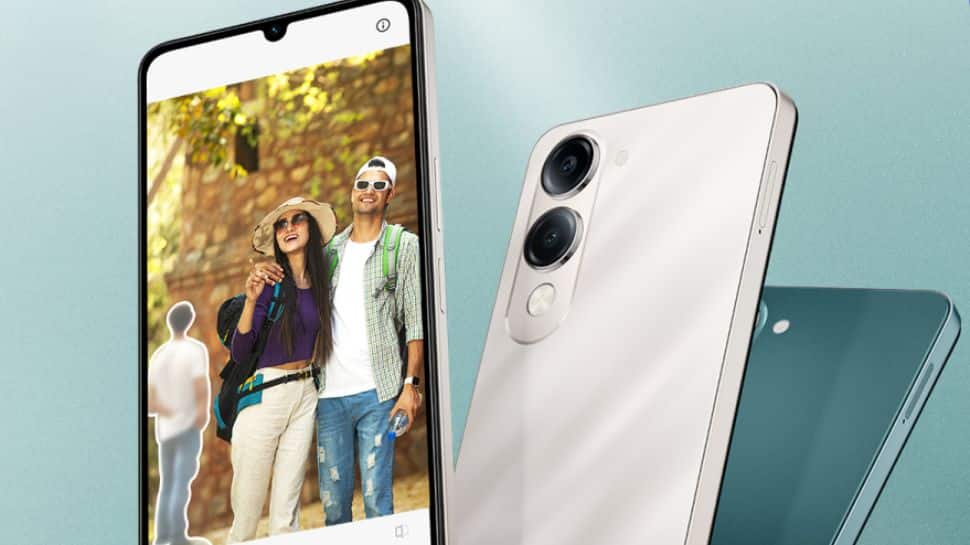
Vivo Y19 5G India Launch: Chinese smartphone manufacturer Vivo has launched the Vivo Y19 5G smartphone for mid-segment buyers in the Indian market. The phone runs Android 15 with Funtouch OS 15 on top. The newly launched smartphone comes with AI features such as AI Erase, AI Photo Enhance, and AI Documents. It is offered in three storage variants: 4GB + 64GB, 4GB + 128GB and 6GB + 128GB and comes with IP64 rating for dust and water resistance. Notably, the smartphone has succeeded the Vivo Y18, which was introduced in May 2024 in the country. The device comes in two colour ptions: Titanium Silver and Majestic Green. Vivo Y19 5G Price In India And Availability The device is available in three storage variants: the 4GB RAM + 64GB storage model is priced at Rs 10,499, the 4GB RAM + 128GB variant costs Rs 11,499, and the top-end 6GB RAM + 128GB storage option is available for Rs 12,999. Consumers can purchase the handset via Flipkart, the Vivo India e-store, and authorised retail partners in the country. Vivo Y19 5G Launch Offers Flipkart is offering an instant bank discount of Rs 750 on SBI card transactions as part of the SASA LELE sale. Adding further, the customers can also avail a three-month no-cost EMI option with zero down payment. Vivo Y19 5G Specifications: The device features a 6.74-inch IPS display with HD+ resolution and a 90Hz refresh rate. It offers up to 840 nits of peak brightness, a pixel density of 260 PPI, TUV Low Blue Light certification, and 70% NTSC color coverage. The phone is powered by the MediaTek Dimensity 6300 SoC. On the photography front, the phone includes a 13MP primary camera along with a 0.08MP secondary lens, while the front houses a 5MP selfie camera. It is backed by a 5,500mAh BlueVolt battery supporting 15W wired fast charging, Smart Charging Engine 2.0, and a five-year Battery Health guarantee. For security, it offers a side-mounted fingerprint scanner and supports face unlock.

Goodbye Skype: Microsoft’s Video-Calling Platform To Retire On May 5; What Will Happen To Current Subscribers? | Technology News
Microsoft Skype Shutting Down: Microsoft has announced that it will shut down its video-calling platform, Skype, on May 5 — just a few days from now. The company believes it no longer needs both Skype, the video-calling platform that made headlines in the early 2000s, and Teams in its business plans. This move is a part of the company’s broader strategy to consolidate its communication platforms and focus on Microsoft Teams. However, tech giant Microsoft did not make the decision to shut down Skype overnight and its update was first announced earlier this year. People have got enough time to make the transition from Skype to Teams. Skype Launch Date The video platform was launched in 2003 by Danish software developer Janus Friis and Swedish developer Niklas Zennstrom. Skype was among the most popular video-calling platforms. Skype Features: What Will Happen To Current Subscribers This change will affect both free and paid Skype users, but not Skype for Business. Microsoft will stop offering paid Skype features to new customers, including Skype Credit and subscriptions for making and receiving domestic and international calls. However, the current subscribers can continue to use their existing credit and active subscriptions until the conclusion of their next renewal cycle. Skype Users Can Switch To Microsoft Teams Microsoft says that Skype users will not face any major issues when migrating to Teams, as their existing Skype IDs can be used to log in and easily transfer chats and contacts. However, both platforms have similar features which includes one-on-one and group calls, messaging, and file sharing.

WhatsApp Rolls Out Advanced Chat Privacy: Here’s What It Does And How It Works | Technology News
New Delhi: WhatsApp is rolling out a new feature called “Advanced Chat Privacy” to improve the security of your personal and group chats. Users with this new update won’t be able to export chats or automatically download media. This adds an extra layer of protection. Plus, the feature also blocks mentions of Meta AI in chats which makes your conversations even more private. WhatsApp shared the update in a blog post, explaining that the new setting is designed for chats that involve sensitive topics—especially when the group includes people who may not know each other well. “This new setting… helps prevent others from taking content outside of WhatsApp for when you may want extra privacy,” the company said on Thursday. Once turned on for a specific chat or group, the Advanced Chat Privacy feature stops members from exporting messages, automatically saving media, or using messages with outside AI tools. WhatsApp says the goal is to give users more control—especially in group chats where everyone might not know each other well. WhatsApp already has features like disappearing messages and chat locks but this new setting is designed for semi-public or topic-based groups like health support forums or community organizing chats. These conversations are often private in nature, even though the members may not know each other personally. This is just the beginning for the new feature. WhatsApp says more upgrades are coming soon, with even stronger privacy options on the way. The feature is currently rolling out worldwide and will be available to all users in the latest app update over the next few days.

OPPO A5 Pro 5G Launched In India With AI Features Under Rs 20,000; Check Specs, Bank Offers, and Alternative Options | Technology News
OPPO A5 Pro 5G India Launch: Chinese electronic brand Oppo has launched the OPPO A5 Pro 5G smartphone for the mid-segment buyers in the Indian market. The newly launched smartphone comes as a successor to the OPPO A3 Pro, which launched in the country last June. It is available in Mocha Brown and Feather Blue shades colour options. The OPPO A5 Pro 5G is offered in the 8GB + 128GB and 8GB+256GB storage model. OPPO A5 Pro 5G AI Features: The device comes equipped with a variety of AI-powered features, such as AI Eraser 2.0, LivePhoto, AI Portrait Retouching, AI Reflection Remover, AI Studio, and more. OPPO A5 Pro 5G Specification The smartphone features a 6.67-inch IPS panel with an HD+ resolution and a smooth 120Hz refresh rate, ensuring fluid visuals. The device is powered by the MediaTek Dimensity 6300 SoC, which is supported by VC cooling technology for improved thermal management during intensive tasks. It runs on ColorOS 15 based on Android 15 and comes pre-installed with the Trinity Engine for enhanced performance. The phone packs a robust 5,800mAh battery that supports 45W SuperVOOC wired fast charging, offering quick power top-ups. On the photography front, the smartphone houses a 50MP main sensor with an f/1.8 aperture and autofocus, accompanied by a 2MP monochrome camera with an f/2.4 aperture and an LED flash. For selfies and video calls, there is an 8MP front camera with an f/2.0 aperture. OPPO A5 Pro 5G Price In India And Availability The smartphone is available in two storage variants. The base model with 8GB of RAM and 128GB of internal storage is priced at Rs 17,999, while the higher-end variant offering 8GB of RAM and 256GB of storage comes at a price of Rs 19,999. Consumers can purchase the smartphone via OPPO India e-store, Flipkart, Amazon, and major retail outlets across the country. OPPO A5 Pro 5G Bank Offers OPPO is providing an instant bank discount of up to Rs 1,500 on credit cards from SBI, IDFC FIRST Bank, BOB Financial, Federal Bank, and DBS. Adding further, customers can benefit from up to six months of no-cost EMI and a zero down payment option. OPPO A5 Pro 5G Alternative The Infinix Note 50s 5G+ is priced at Rs 15,999, while the iQOO Z10x comes in slightly lower at Rs 14,999. Meanwhile, the Acer Super ZX Pro is available for Rs 17,990. The realme P3 is priced at Rs 16,999, offering a competitive option in its segment. Adding further, the POCO X7 is available for Rs 18,698, while the Motorola Edge 50 Fusion comes in at Rs 19,499, providing customers with a range of choices across different price points.
How To Recover Banned WhatsApp Account; Know Reasons And Follow THESE Steps | Technology News
Banned Whatsapp Account Recovery: WhatsApp, a Meta-owned platform, has become an integral part of modern-day communication. The social media is widely used across corporate offices for professional interactions and among individuals for staying connected with family and friends, making it an essential part of daily personal and professional life. Getting banned on WhatsApp can feel like a nightmare, but thankfully, you can recover your blocked account. In this guide, we’ll show you how to restore a mistakenly banned account and explain some common reasons why accounts get blocked. According to an official statement, WhatsApp does not allow “falsehoods, misrepresentations, or misleading statements” on the app. Why WhatsApp Accounts Get Banned? WhatsApp accounts get banned for violating the platform’s terms of service, such as sending bulk messages, using unofficial apps, spreading misinformation, or engaging in suspicious activity. Repeated complaints, spamming, or abusive behavior can also trigger an account ban by WhatsApp. How To Remove Ban From WhatsApp Step 1: Open WhatsApp, go to Settings, and tap on the Help section. Step 2: In the Help menu, select Contact Us or Report a Problem to reach WhatsApp’s support team. Step 3: Clearly explain that your account was banned without any mistake and request a review. Step 4: Make sure to include your name, contact number, and all relevant details to strengthen your case. Step 5: Submit the report, clearly stating why you believe the ban was a mistake, and wait for WhatsApp’s response. How Long Will It Take to Recover? In many cases, if WhatsApp temporarily bans your account, the restriction can be lifted within 24 hours to 30 days. During this time, avoid using third-party WhatsApp mods like GBWhatsApp or WhatsApp Plus. Often, accounts get temporarily banned for using unofficial apps, which violate WhatsApp’s Community Guidelines. Using these third-party apps can worsen the situation and could delay the recovery of your account.

Users Can Now Buy Products In ChatGPT; OpenAI Rolls Out Improvements To ChatGPT Search, Shopping | Technology News
New Delhi: OpenAI on Tuesday announced the rollout product purchase on ChatGPT search which will be rolled out to Plus, Pro, Free, and logged-out users everywhere ChatGPT is available. The Sam Altman-run AI company said that products are selected by ChatGPT independently and are not ads. “Users can now search for a product, compare options, and buy products in ChatGPT. People will have personalised recommendations, visual product details, pricing, and reviews for products, with direct links to buy,” said OpenAI. “Users come to ChatGPT with all kinds of questions, and one common topic is researching and buying products. Now, when a user query suggests shopping intent (e.g., “I’m looking to buy costumes for my two dogs”), ChatGPT can display relevant product options in visually rich carousels, provide additional product details, and link users to websites where they can learn more or make a purchase – available in GPT-4o and 4o-mini,” it added. OpenAI said that product appears in the visual carousel when ChatGPT perceives it’s relevant to the user’s intent. ChatGPT assesses intent based on the user’s query and other available context, such as memories or custom instructions. Product listings shown by ChatGPT may include prices, based on third-party providers review. After clicking on that price, users may see additional pricing options from other merchants who also offer that product. Prices shown in ChatGPT’s initial response typically reflect the price from the first merchant listed, which may not be the lowest available price, OpenAI said.