7 Advanced Feature Engineering Tricks for Text Data Using LLM EmbeddingsImage by Editor Introduction Large language models (LLMs) are not only good at understanding and generating text; they can also turn raw text into numerical representations called embeddings. These embeddings are useful for incorporating additional information into traditional predictive machine learning models—such as those used in scikit-learn—to improve downstream performance. This article presents seven advanced Python examples of feature engineering tricks that add extra value to text data by leveraging LLM-generated embeddings, thereby enhancing the accuracy and robustness of downstream machine learning models that rely on text, in applications such as sentiment analysis, topic classification, document clustering, and semantic similarity detection. Common setup for all examples Unless stated otherwise, the seven example tricks below make use of this common setup. We rely on Sentence Transformers for embeddings and scikit-learn for modeling utilities. !pip install sentence-transformers scikit-learn -q from sentence_transformers import SentenceTransformer import numpy as np # Load a lightweight LLM embedding model; builds 384-dimensional embeddings model = SentenceTransformer(“all-MiniLM-L6-v2”) !pip install sentence–transformers scikit–learn –q from sentence_transformers import SentenceTransformer import numpy as np # Load a lightweight LLM embedding model; builds 384-dimensional embeddings model = SentenceTransformer(“all-MiniLM-L6-v2”) 1. Combining TF-IDF and Embedding Features The first example shows how to jointly extract—given a source text dataset like fetch_20newsgroups—both TF-IDF and LLM-generated sentence-embedding features. We then combine these feature types to train a logistic regression model that classifies news texts based on the combined features, often boosting accuracy by capturing both lexical and semantic information. from sklearn.datasets import fetch_20newsgroups from sklearn.feature_extraction.text import TfidfVectorizer from sklearn.linear_model import LogisticRegression from sklearn.preprocessing import StandardScaler # Loading data data = fetch_20newsgroups(subset=”train”, categories=[‘sci.space’, ‘rec.autos’]) texts, y = data.data[:500], data.target[:500] # Extracting features of two broad types tfidf = TfidfVectorizer(max_features=300).fit_transform(texts).toarray() emb = model.encode(texts, show_progress_bar=False) # Combining features and training ML model X = np.hstack([tfidf, StandardScaler().fit_transform(emb)]) clf = LogisticRegression(max_iter=1000).fit(X, y) print(“Accuracy:”, clf.score(X, y)) 1 2 3 4 5 6 7 8 9 10 11 12 13 14 15 16 17 from sklearn.datasets import fetch_20newsgroups from sklearn.feature_extraction.text import TfidfVectorizer from sklearn.linear_model import LogisticRegression from sklearn.preprocessing import StandardScaler # Loading data data = fetch_20newsgroups(subset=‘train’, categories=[‘sci.space’, ‘rec.autos’]) texts, y = data.data[:500], data.target[:500] # Extracting features of two broad types tfidf = TfidfVectorizer(max_features=300).fit_transform(texts).toarray() emb = model.encode(texts, show_progress_bar=False) # Combining features and training ML model X = np.hstack([tfidf, StandardScaler().fit_transform(emb)]) clf = LogisticRegression(max_iter=1000).fit(X, y) print(“Accuracy:”, clf.score(X, y)) 2. Topic-Aware Embedding Clusters This trick takes a few sample text sequences, generates embeddings using the preloaded language model, applies K-Means clustering on these embeddings to assign topics, and then combines the embeddings with a one-hot encoding of each example’s cluster identifier (its “topic class”) to build a new feature representation. It is a useful strategy for creating compact topic meta-features. from sklearn.cluster import KMeans from sklearn.preprocessing import OneHotEncoder texts = [“Tokyo Tower is a popular landmark.”, “Sushi is a traditional Japanese dish.”, “Mount Fuji is a famous volcano in Japan.”, “Cherry blossoms bloom in the spring in Japan.”] emb = model.encode(texts) topics = KMeans(n_clusters=2, n_init=”auto”, random_state=42).fit_predict(emb) topic_ohe = OneHotEncoder(sparse_output=False).fit_transform(topics.reshape(-1, 1)) X = np.hstack([emb, topic_ohe]) print(X.shape) from sklearn.cluster import KMeans from sklearn.preprocessing import OneHotEncoder texts = [“Tokyo Tower is a popular landmark.”, “Sushi is a traditional Japanese dish.”, “Mount Fuji is a famous volcano in Japan.”, “Cherry blossoms bloom in the spring in Japan.”] emb = model.encode(texts) topics = KMeans(n_clusters=2, n_init=‘auto’, random_state=42).fit_predict(emb) topic_ohe = OneHotEncoder(sparse_output=False).fit_transform(topics.reshape(–1, 1)) X = np.hstack([emb, topic_ohe]) print(X.shape) 3. Semantic Anchor Similarity Features This simple strategy computes similarity to a small set of fixed “anchor” (or reference) sentences used as compact semantic descriptors—essentially, semantic landmarks. Each column in the similarity-feature matrix contains the similarity of the text to one anchor. The main value lies in allowing the model to learn relationships between the text’s similarity to key concepts and a target variable—useful for text classification models. from sklearn.metrics.pairwise import cosine_similarity anchors = [“space mission”, “car performance”, “politics”] anchor_emb = model.encode(anchors) texts = [“The rocket launch was successful.”, “The car handled well on the track.”] emb = model.encode(texts) sim_features = cosine_similarity(emb, anchor_emb) print(sim_features) from sklearn.metrics.pairwise import cosine_similarity anchors = [“space mission”, “car performance”, “politics”] anchor_emb = model.encode(anchors) texts = [“The rocket launch was successful.”, “The car handled well on the track.”] emb = model.encode(texts) sim_features = cosine_similarity(emb, anchor_emb) print(sim_features) 4. Meta-Feature Stacking via Auxiliary Sentiment Classifier For text associated with labels such as sentiments, the following feature-engineering technique adds extra value. A meta-feature is built as the prediction probability returned by an auxiliary classifier trained on the embeddings. This meta-feature is stacked with the original embeddings, resulting in an augmented feature set that can improve downstream performance by exposing potentially more discriminative information than raw embeddings alone. A slight additional setup is needed for this example: !pip install sentence-transformers scikit-learn -q from sentence_transformers import SentenceTransformer from sklearn.model_selection import train_test_split from sklearn.linear_model import LogisticRegression from sklearn.preprocessing import StandardScaler # Import StandardScaler import numpy as np embedder = SentenceTransformer(“all-MiniLM-L6-v2”) # 384-dim # Small dataset containing texts and sentiment labels texts = [“I love this!”, “This is terrible.”, “Amazing quality.”, “Not good at all.”] y = np.array([1, 0, 1, 0]) # Obtain embeddings from the embedder LLM emb = embedder.encode(texts, show_progress_bar=False) # Train an auxiliary classifier on embeddings X_train, X_test, y_train, y_test = train_test_split( emb, y, test_size=0.5, random_state=42, stratify=y ) meta_clf = LogisticRegression(max_iter=1000).fit(X_train, y_train) # Leverage the auxiliary model’s predicted probability as a meta-feature meta_feature = meta_clf.predict_proba(emb)[:, 1].reshape(-1, 1) # Prob of positive class # Augment original embeddings with the meta-feature # Do not forget to scale again for consistency scaler = StandardScaler() emb_scaled = scaler.fit_transform(emb) X_aug = np.hstack([emb_scaled, meta_feature]) # Stack features together print(“emb shape:”, emb.shape) print(“meta_feature shape:”, meta_feature.shape) print(“augmented shape:”, X_aug.shape) print(“meta clf accuracy on test slice:”, meta_clf.score(X_test, y_test)) 1 2 3 4 5 6 7 8 9 10 11 12 13 14 15 16 17 18 19 20 21 22 23 24 25 26 27 28 29 30 31 32 33

100 5G Labs Set Up Across India To Boost 6G Research Ecosystem: Govt | Technology News
New Delhi: India has set up 100 5G labs across the country to develop use cases and enhance the 6G research and development ecosystem, the Department of Telecommunications (DoT) said on Wednesday. The government’s collaborative platform Bharat 6G Alliance has also signed 10 international collaborations with global 6G bodies, aiming for a 10 percent share of global 6G patents by 2030, an official statement said. Neeraj Mittal, Secretary (Telecom), made these comments as DoT led the thematic session on ‘Digital Communication’ at the Emerging Science, Technology and Innovation Conclave here. Mittal emphasised that it is the bedrock of all productive activity and that India’s telecom revolution has a direct bearing on national economic growth, adding that India has achieved one of the fastest 5G rollouts globally. The 100 5G labs will position the nation for leadership in 6G technologies, he said. Mittal highlighted that the Government’s approach to next-generation communication is multi-pronged, supporting research and development, encouraging domestic manufacturing, and building strong bridges between academia, industry, and government. Add Zee News as a Preferred Source He informed that over 100 R&D projects dedicated to 6G are currently being supported, with a focus on advancing Open RAN, indigenous chipsets, AI-based intelligent networks, and regulatory sandboxes to foster innovation. The event featured discussions on private networks and India’s telecom goals from industry leaders, and a panel discussion on advancing indigenous technologies. The panel also explored extending the 5G ecosystem in India, advancing indigenous PNT through the NavIC L1 signal, and building disruptive technology stacks from D2M to 6G. ‘ESTIC 2025’ took place from November 3 to 5, attracting over 3,000 participants from academia, research institutions, industry and government, along with Nobel laureates, eminent scientists, innovators and policymakers.
7 Machine Learning Projects to Land Your Dream Job in 2026
7 Machine Learning Projects to Land Your Dream Job in 2026Image by Editor Introduction machine learning continues to evolve faster than most can keep up with. New frameworks, datasets, and applications emerge every month, making it hard to know what skills will actually matter to employers. But this one thing never changes: projects speak louder than certificates. When hiring managers scan portfolios, they want to see real-world applications that solve meaningful problems, not just notebook exercises. The right projects don’t just show that you can code — they prove that you can think like a data scientist and build like an engineer. So if you want to stand out in 2026, these seven projects will help you do exactly that. 1. Predictive Maintenance for IoT Devices Manufacturers, energy providers, and logistics companies all want to predict equipment failure before it happens. Building a predictive maintenance model teaches you how to handle time-series data, feature engineering, and anomaly detection. You’ll work with sensor data, which is messy and often incomplete, so it’s a great way to practice real-world data wrangling. A good approach is to use Long Short-Term Memory (LSTM) networks or tree-based models like XGBoost to predict when a machine is likely to fail. Combine that with data visualization to show insights over time. This kind of project signals that you can bridge hardware and AI — an increasingly desirable skill as more devices become connected. If you want to take it further, create an interactive dashboard that shows predicted failures and maintenance schedules. This demonstrates not just your machine learning skills but also your ability to communicate results effectively. Dataset to get started: NASA C-MAPSS Turbofan Engine Degradation 2. AI-Powered Resume Screener Every company wants to save time on recruiting, and AI-based screening tools are already becoming standard. By building one yourself, you’ll explore natural language processing (NLP) techniques like tokenization, named entity recognition, and semantic search. This project combines text classification and information extraction — two critical subfields in modern machine learning. Start by collecting anonymized resumes or job postings from public datasets. Then, train a model to match candidates with roles based on skill keywords, project relevance, and even sentiment cues from descriptions. It’s an excellent demonstration of how AI can streamline workflows. Add a bias detection feature if you want to stand out even more — and establish a legitimate side hustle, just like 36% of Americans already have. And with machine learning, your opportunities for scaling are basically infinite. Dataset to get started: Updated Resume Dataset 3. Personalized Learning Recommender Education technology (EdTech) is one of the fastest-growing industries, and recommendation systems drive much of that innovation. A personalized learning recommender uses a combination of user profiling, content-based filtering, and collaborative filtering to suggest courses or learning materials tailored to individual preferences. Building this kind of system forces you to work with sparse matrices and similarity metrics, which deepens your understanding of recommendation algorithms. You can use public education datasets like those from Coursera or Khan Academy to start. To make it portfolio-ready, include user interaction tracking and explainability features — such as why a course was recommended. Recruiters love seeing interpretable AI, especially in human-centered applications like education. Dataset to get started: KDD Cup 2015 4. Real-Time Traffic Flow Prediction Urban AI is one of the hottest emerging fields, and traffic prediction sits right at its core. This project challenges you to process live or historical data to forecast congestion levels. It’s ideal for showing off your data streaming and time-series modeling skills. You can experiment with architectures like Graph Neural Networks (GNNs), which model city roads as interconnected nodes. Alternatively, CNN–LSTM hybrids perform well when you need to capture both spatial and temporal patterns. Make sure to highlight your deployment pipeline if you host your model in a cloud environment or stream data from APIs like Google Maps. That level of technical maturity separates beginners from engineers who can deliver end-to-end solutions. Dataset to get started: METR-LA (traffic sensor time series) 5. Deepfake Detection System As AI-generated media becomes more sophisticated, deepfake detection has turned into an urgent global concern. Building a classifier that distinguishes between authentic and manipulated images or videos not only strengthens your computer vision skills but also shows that you’re aware of AI’s ethical dimensions. You can start by using publicly available datasets like FaceForensics++ and experiment with convolutional neural networks (CNNs) or transformer-based models. The biggest challenge will be generalization — training a model that works across unseen data and different manipulation techniques. This project shines because it combines technical and moral responsibility. A well-documented notebook that discusses false positives and potential misuse makes you stand out as someone who doesn’t just build AI but understands its implications. Dataset to get started: Deepfake Detection Challenge (DFDC) 6. Multimodal Sentiment Analysis Most sentiment analysis projects focus on text, but modern applications demand more. Think of a model that can analyze speech tone, facial expressions, and text simultaneously. That’s where multimodal learning comes in. It’s complex, fascinating, and instantly eye-catching on a resume. You’ll likely combine CNNs for visual data, recurrent neural networks (RNNs) or transformers for textual data, and maybe even spectrogram analysis for audio. The integration challenge — making all these modalities talk to each other — is what really showcases your skill. If you want to polish the project for recruiters, create a simple web interface where users can upload a short video and see the detected sentiment in real time. That demonstrates deployment skills, user experience awareness, and creativity all at once. Dataset to get started: CMU-MOSEI 7. AI Agent for Financial Forecasting Finance has always been fertile ground for machine learning, and 2026 will be no different. Building an AI agent that learns to predict stock movements or cryptocurrency trends allows you to combine reinforcement learning with traditional forecasting techniques. You can start simple — training an agent using historical data and a reward system based on return rates. Then expand by incorporating real-time

OnePlus 15 Launched With Qualcomm Snapdragon 8 Elite Gen 5 Chipset; Check Display, Camera, Battery, Price And Other Features | Technology News
OnePlus 15 Launch: OnePlus has launched the OnePlus 15 smartphone in China, along with the OnePlus Ace 6. The smartphone succeeds last year’s OnePlus 13 and comes with several major upgrades. It features Android’s first “Touch Display Sync” technology, which greatly improves touch accuracy and stability for a faster, smoother, and more responsive experience. The company has also confirmed that the OnePlus 15 will be launched in other regions soon. The OnePlus 15 measures between 8.1 mm and 8.2 mm in thickness, depending on the color variant. In China, it is available in three color options: Sand Dune, Absolute Black, and Misty Purple. However, In India, Amazon has created a dedicated microsite for the smartphone, but the official launch date has not yet been announced. OnePlus 15 Specifications Add Zee News as a Preferred Source The OnePlus 15 features a 6.78 inch AMOLED display with a Full HD Plus resolution of 2772 by 1272 pixels. It offers a peak brightness of up to 1800 nits and a 120 Hz refresh rate, which can reach 165 Hz in certain situations. It is powered by the Qualcomm Snapdragon 8 Elite Gen 5 chipset and comes with two RAM options, 12 GB and 16 GB LPDDR5X, along with storage choices of 256 GB, 512 GB, or 1 TB using UFS 4.1 technology. It has a 7300 mAh battery that supports 120 W Super Flash Charge and 50 W wireless charging. For photography, the device includes a triple rear camera setup with a 50 MP wide lens, a 50 MP ultra wide lens, and a 50 MP telephoto lens. On the front, it has a 32 MP camera for selfies. The phone introduces a new Glacier Cooling System that uses an ultra thin hand tearable steel material, expanding the vapor cooling area by 43 percent and improving water absorption by 100 percent. It also includes various sensors such as proximity, ambient light, color temperature, electronic compass, accelerometer, gyroscope, hall, laser focus, spectrum, and an IR blaster. For security, the device features an in display ultrasonic fingerprint scanner and supports 5G, Wi Fi 7, NFC, Beidou, GPS, GLONASS, Galileo, and QZSS connectivity. (Also Read: OnePlus OxygenOS 16 Update With AI Integration: Check Full List Of Eligible Devices, Rollout Phase, And Key Features) OnePlus 15 Price The OnePlus 15 starts at CNY 3999, which is around Rs 50,000, for the base model with 12 GB RAM and 256 GB storage. Other variants are priced at CNY 4299, around Rs 53,000, for 16 GB RAM and 256 GB storage, CNY 4599, around Rs 57,000, for 12 GB RAM and 512 GB storage, and CNY 4899, around Rs 61,000, for 16 GB RAM and 512 GB storage. The top model with 16 GB RAM and 1 TB storage is priced at CNY 5399, approximately Rs 67,000. The OnePlus 15 will be available in three colours, Absolute Black, Misty Purple, and Sand Dune. Sales will begin in China today on October 28 through the company online store.
OpenAI Offers Free Access To ChatGPT Go For All Users In India For 1 Year From THIS Date | Technology News
OpenAI ChatGPT Go Access In India: OpenAI announced that it will offer one year of free access to ChatGPT Go for all users in India who sign up during a special promotional period starting November 4. The offer celebrates OpenAI’s first DevDay Exchange event in Bengaluru, which will also take place on the same day. ChatGPT Go is OpenAI’s new subscription plan that provides access to advanced features such as higher message limits, more image generation, longer memory, and the ability to upload extra files and images. All these features are powered by the latest GPT 5 model. OpenAI ChatGPT Go Access Introduced In India Add Zee News as a Preferred Source The plan was first introduced in India in August after users requested a more affordable way to use ChatGPT’s advanced tools. Within a month, the number of paid ChatGPT users in India more than doubled, prompting OpenAI to expand ChatGPT Go to about 90 countries worldwide. India is now ChatGPT’s second-largest and one of the fastest-growing markets, with millions of students, professionals, and developers using the tool daily to learn new skills, enhance creativity, and build innovative projects. The new offer reflects OpenAI’s continued “India-first” approach and supports the government’s IndiaAI Mission, which aims to expand access to artificial intelligence tools and encourage innovation across the country. OpenAI Working With Civil Society Groups OpenAI is also working with civil society groups, educational platforms, and government-led initiatives to make AI tools more accessible and inclusive. Existing ChatGPT Go subscribers in India will also be eligible for the free 12-month offer, with more details to be announced soon. Nick Turley, Vice President and Head of ChatGPT, said the company has been inspired by how Indian users are using ChatGPT Go. “Ahead of our first DevDay Exchange event in India, we’re making ChatGPT Go freely available for a year to help more people across India easily access and benefit from advanced AI. We’re excited to see the amazing things our users will build, learn, and achieve with these tools,” he said. (With IANS Inputs)

Apple iPhone 17e Likely To Make India Debut With Display Upgrade And A19 Chip; Check Leaked Specifications, Price And Other Features | Technology News
Apple iPhone 17e India Launch: Apple is expected to launch the iPhone 17e in the first quarter of 2026. The upcoming model will succeed the iPhone 16e, which is known for its strong performance, Apple Intelligence features, and affordable price. With the iPhone 17e, Apple is rumored to introduce a major design and display upgrade that could attract many users to switch. As per reports, the iPhone 17e may feature a Dynamic Island instead of the traditional display notch. This change could give the phone a modern look and improve the overall user experience compared to older models. Apple iPhone 17e: What Is Dynamic Island Add Zee News as a Preferred Source It is a pill-shaped interactive area at the top of the screen that displays ongoing activities like calls, music, navigation, and alerts. It also houses the front camera and Face ID sensors. Apple first introduced this feature with the iPhone 14 Pro and iPhone 14 Pro Max in 2022, later bringing it to the iPhone 15, 16, and now the 17 series. If the reports are true, the iPhone 17e will be the first affordable model to include this premium design feature. (Also Read: OnePlus 15 Launched With Qualcomm Snapdragon 8 Elite Gen 5 Chipset; Check Display, Camera, Battery, Price And Other Features) iPhone 17e Specifications (Leaked) According to a leaks from Digital Chat Station, Apple is reportedly planning to bring the Dynamic Island feature to the upcoming iPhone 17e. The device is expected to be powered by the A19 chip, though it may include slightly modified cores to align with its pricing strategy. Despite the addition of Dynamic Island, the iPhone 17e will likely retain a 6.1-inch OLED display with a 60Hz refresh rate, unlike the flagship iPhone 17 models, which feature a smoother 120Hz ProMotion display. Apple iPhone 17e India Launch And Price (Expected) The upcoming iPhone 17e is expected to be priced similarly to the iPhone 16e. Early leaks suggest that the iPhone 17e could launch in India with a starting price of around Rs 59,900. It is expected to launch in February 2026 around a year after the iPhone 16e.
Two AIs – Artificial Intelligence And Aspirational Indian Powering India Today: Bansuri Swaraj At TiEcon Delhi 2025 | Technology News
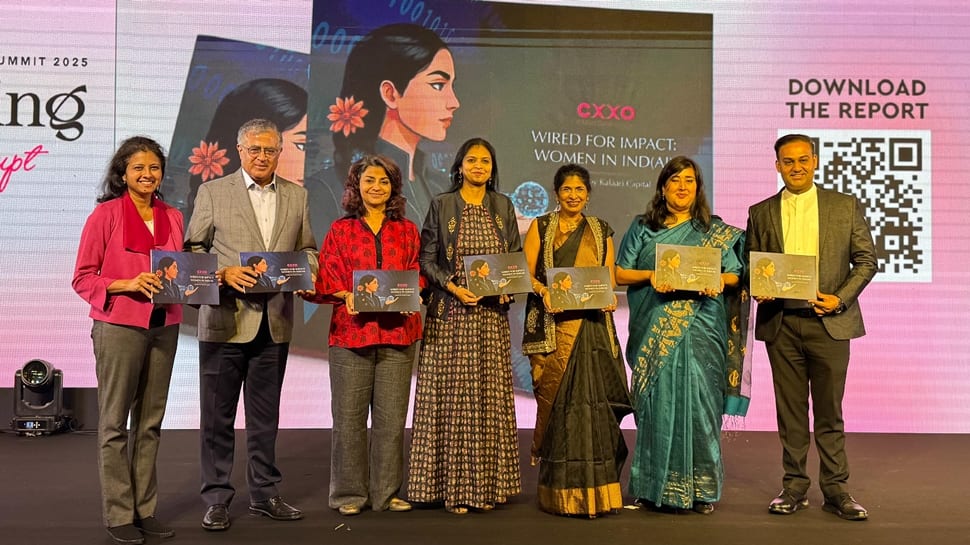
With the Narendra Modi government focusing on entrepreneurship, the country already has such an ecosystem in place that fosters innovation. Lok Sabha MP Bansuri Swaraj on Thursday said that India today is powered by two AIs and when the two meet, it accelerates the progress of the country. Speaking during TiEcon Delhi 2025, the BJP MP affirmed her faith in women-led development, saying that under Digital India, technology has become a tool for public good. “India today is powered by two AIs- Artificial Intelligence and the Aspirational Indian. When the two meet, they accelerate progress. As we enter the decade of deeptech, women must be at the forefront because if we leave out half of our population, we are not building artificial intelligence, we are risking artificial ignorance. Women who were once silent engines of progress are now becoming focal visionaries in technology, and that shift is transforming India’s story. Under the Digital India vision of Prime Minister Narendra Modi, technology has become a tool for public good, empowering talent across the nation and ensuring equitable access for women,” said Swaraj, after unveiling the ‘Wired for Impact: Women in AI’ report by Kalaari. The report recognizes and applauds the achievements of women leaders shaping India’s AI landscape. With over 2000 delegates, TiEcon Delhi 2025 affirmed its position as one of the country’s leading deeptech summit while shining a powerful spotlight on women-led innovation, AI inclusion, and financial leadership. The Wired for Impact report reveals that while women currently make up only one in five professionals in India’s technology workforce, this number is projected to grow nearly fourfold by 2027, with over 3.3 lakh women expected to hold AI roles. The report also found that AI/ML has emerged as the most preferred career track for women in technology, with 41% choosing it over other domains, a figure that even surpasses their male counterparts at 37%. Add Zee News as a Preferred Source TiEcon Delhi 2025 brought together policymakers, investors, and founders on one platform, creating a powerful collective voice in support of India’s entrepreneurial growth. “We are gratified about the participation from corporates and in particular, key decision makers across the government department. Our startup pitching sessions highlighted breakthrough ideas and the investor community’s enthusiasm reaffirmed the immense potential that lies ahead for India’s innovation economy,” said Geetika Dayal, Director General, TiE Delhi-NCR. Speaking at the conference Vani Kola, MD, Kalaari Capital said, “Innovation reaches its full potential only when it reflects the diversity of those it serves. In India, women continue to be underrepresented in technology, especially in roles that require advanced technical skills or leadership. With AI specifically, underrepresentation doesn’t just limit participation; it limits perspective and, ultimately, impact. When the systems we build learn and reason from a narrow or biased worldview, they risk encoding those same limitations into the intelligence that shapes our future.” Experts noted that if India is to build better and more trustworthy AI for the world, diversity must be treated as a mission-critical KPI.

Elon Musk’s Starlink To Run Technical, Security Demos In Mumbai From Oct 30 | Technology News
New Delhi: Tesla CEO Elon Musk-led Starlink is scheduled to conduct demonstration runs in Mumbai on October 30 and 31 to demonstrate compliance with India’s security and technical requirements for satellite broadband services, according to people familiar with the developments. The demos to be done before law enforcement agencies will be based on the provisional spectrum assigned to Starlink, which would mark a significant step ahead of its planned entry into the Indian satellite broadband market, they said. This step is necessary for the company to obtain clearances to commence commercial operations in the country. Starlink will run a demo to show compliance with the security and technical conditions of Global Mobile Personal Communication by Satellite (GMPCS) authorisation. Over 10 satellite operators, including the licensed Starlink, have entered India, with the private sector permitted to hold up to 100 per cent FDI. Add Zee News as a Preferred Source Elon Musk’s Starlink is the world’s dominant satcom operator with a constellation of 7,578 satellites. India has currently provided necessary approvals to Starlink, Reliance Jio-SES JV, and Bharti Group backed-Eutelsat OneWeb to offer satcom services in the country. The opening up of direct-to-cell communications service, which refers to a signal from a satellite directly to a mobile phone, has strengthened the growing satcom market in India. Internet penetration remains limited in certain regions of the country, underscoring the need for satellite internet to complement existing networks. Satellite internet refers to the internet service provided through satellites placed in Geostationary Orbits (GSO) or Non-Geostationary Orbits (NGSO). The government had informed in August that the data, traffic and other details accumulated by Elon Musk’s Starlink will be stored in India, and the domestic user traffic is not to be mirrored to any system/server located abroad.

WhatApp New Feature: Soon, Individual Storage Management Per Chat At Your Fingertips – Details | Technology News
If you’ve ever run out of phone storage and wondered which WhatsApp chat is the culprit, there’s some good news coming your way. WhatsApp is reportedly working on a handy new feature that will let users see — and manage — how much storage space each individual chat is using. The update was spotted in a recent beta version of the app and, according to WABetaInfo, the feature is already being tested by a few users through Apple’s TestFlight program. So, what’s new here? Basically, WhatsApp is adding a “Manage Storage” option right inside the chat info screen. This means you’ll be able to open a specific chat — whether it’s with a friend or a group — and see exactly how much space it’s taking up. You’ll even get a neat gallery-style breakdown of all the photos, videos, documents, and other files shared in that conversation. Add Zee News as a Preferred Source Up until now, users had to dig through the app’s general settings under Storage and Data > Manage Storage to find this kind of information. That method shows overall storage usage but mixes up files from all chats. The new feature, on the other hand, zooms in on each conversation, making it way easier to spot which chats are hoarding the most space. If you often share memes, long videos, or hundreds of photos in group chats, this could be a real lifesaver. Instead of guessing which chat to clear out, you’ll be able to see exactly where your gigabytes are going — and clean up accordingly. WhatsApp hasn’t said when this feature will officially roll out, but since it’s already showing up in beta, it’s safe to assume it’ll make its way to all Android and iOS users soon. When it does, managing storage on WhatsApp will get a lot more intuitive — no more blind deleting or surprise “storage full” pop-ups. Just clear the clutter and keep the chats that actually matter.
Why and When to Use Sentence Embeddings Over Word Embeddings
Why and When to Use Sentence Embeddings Over Word EmbeddingsImage by Editor | ChatGPT Introduction Choosing the right text representation is a critical first step in any natural language processing (NLP) project. While both word and sentence embeddings transform text into numerical vectors, they operate at different scopes and are suited for different tasks. The key distinction is whether your goal is semantic or syntactic analysis. Sentence embeddings are the better choice when you need to understand the overall, compositional meaning of a piece of text. In contrast, word embeddings are superior for token-level tasks that require analyzing individual words and their linguistic features. Research shows that for tasks like semantic similarity, sentence embeddings can outperform aggregated word embeddings by a significant margin. This article will explore the architectural differences, performance benchmarks, and specific use cases for both sentence and word embeddings to help you decide which is right for your next project. Word Embeddings: Focusing on the Token Level Word embeddings represent individual words as dense vectors in a high-dimensional space. In this space, the distance and direction between vectors correspond to the semantic relationships between the words themselves. There are two main types of word embeddings: Static embeddings: Traditional models like Word2Vec and GloVe assign a single, fixed vector to each word, regardless of its context. Contextual embeddings: Modern models like BERT generate dynamic vectors for words based on the surrounding text in a sentence. The primary limitation of word embeddings arises when you need to represent an entire sentence. Simple aggregation methods, such as averaging the vectors of all words in a sentence, can dilute the overall meaning. For example, averaging the vectors for a sentence like “The orchestra performance was excellent, but the wind section struggled somewhat at times” would likely result in a neutral representation, losing the distinct positive and negative sentiments. Sentence Embeddings: Capturing Holistic Meaning Sentence embeddings are designed to encode an entire sentence or text passage into a single, dense vector that captures its complete semantic meaning. Transformer-based architectures, such as Sentence-BERT (SBERT), use specialized training techniques like siamese networks. This ensures that sentences with similar meanings are located close to each other in the vector space. Other powerful models include the Universal Sentence Encoder (USE), which creates 512-dimensional vectors optimized for semantic similarity. These models eliminate the need to write custom aggregation logic, simplifying the workflow for sentence-level tasks. Embeddings Implementations Let’s look at some implementations of embeddings, starting with contextual word embeddings. Make sure you have the torch and transformers libraries installed, which you can do with this line: pip install torch transformers. We will use the bert-base-uncased model. import torch from transformers import AutoTokenizer, AutoModel device=”cuda” if torch.cuda.is_available() else ‘cpu’ bert_model_name=”bert-base-uncased” tok = AutoTokenizer.from_pretrained(bert_model_name) bert = AutoModel.from_pretrained(bert_model_name).to(device).eval() def get_bert_token_vectors(text: str): “”” Returns: tokens: list[str] without [CLS]/[SEP] vecs: torch.Tensor [T, hidden] contextual vectors “”” enc = tok(text, return_tensors=”pt”, add_special_tokens=True) with torch.no_grad(): out = bert(**{k: v.to(device) for k, v in enc.items()}) last_hidden = out.last_hidden_state.squeeze(0) ids = enc[‘input_ids’].squeeze(0) toks = tok.convert_ids_to_tokens(ids) keep = [i for i, t in enumerate(toks) if t not in (‘[CLS]’, ‘[SEP]’)] toks = [toks[i] for i in keep] vecs = last_hidden[keep] return toks, vecs # Example usage toks, vecs = get_bert_token_vectors( “The orchestra performance was excellent, but the wind section struggled somewhat at times.” ) print(“Word embeddings created.”) print(f”Tokens:\n{toks}”) print(f”Vectors:\n{vecs}”) 1 2 3 4 5 6 7 8 9 10 11 12 13 14 15 16 17 18 19 20 21 22 23 24 25 26 27 28 29 30 31 32 import torch from transformers import AutoTokenizer, AutoModel device = ‘cuda’ if torch.cuda.is_available() else ‘cpu’ bert_model_name = ‘bert-base-uncased’ tok = AutoTokenizer.from_pretrained(bert_model_name) bert = AutoModel.from_pretrained(bert_model_name).to(device).eval() def get_bert_token_vectors(text: str): “”“ Returns: tokens: list[str] without [CLS]/[SEP] vecs: torch.Tensor [T, hidden] contextual vectors ““” enc = tok(text, return_tensors=‘pt’, add_special_tokens=True) with torch.no_grad(): out = bert(**{k: v.to(device) for k, v in enc.items()}) last_hidden = out.last_hidden_state.squeeze(0) ids = enc[‘input_ids’].squeeze(0) toks = tok.convert_ids_to_tokens(ids) keep = [i for i, t in enumerate(toks) if t not in (‘[CLS]’, ‘[SEP]’)] toks = [toks[i] for i in keep] vecs = last_hidden[keep] return toks, vecs # Example usage toks, vecs = get_bert_token_vectors( “The orchestra performance was excellent, but the wind section struggled somewhat at times.” ) print(“Word embeddings created.”) print(f“Tokens:\n{toks}”) print(f“Vectors:\n{vecs}”) If all goes well, here’s your output: Word embeddings created. Tokens: [‘the’, ‘orchestra’, ‘performance’, ‘was’, ‘excellent’, ‘,’, ‘but’, ‘the’, ‘wind’, ‘section’, ‘struggled’, ‘somewhat’, ‘at’, ‘times’, ‘.’] Vectors: tensor([[-0.6060, -0.5800, -1.4568, …, -0.0840, 0.6643, 0.0956], [-0.1886, 0.1606, -0.5778, …, -0.5084, 0.0512, 0.8313], [-0.2355, -0.2043, -0.6308, …, -0.0757, -0.0426, -0.2797], …, [-1.3497, -0.3643, -0.0450, …, 0.2607, -0.2120, 0.5365], [-1.3596, -0.0966, -0.2539, …, 0.0997, 0.2397, 0.1411], [ 0.6540, 0.1123, -0.3358, …, 0.3188, -0.5841, -0.2140]]) Word embeddings created. Tokens: [‘the’, ‘orchestra’, ‘performance’, ‘was’, ‘excellent’, ‘,’, ‘but’, ‘the’, ‘wind’, ‘section’, ‘struggled’, ‘somewhat’, ‘at’, ‘times’, ‘.’] Vectors: tensor([[–0.6060, –0.5800, –1.4568, …, –0.0840, 0.6643, 0.0956], [–0.1886, 0.1606, –0.5778, …, –0.5084, 0.0512, 0.8313], [–0.2355, –0.2043, –0.6308, …, –0.0757, –0.0426, –0.2797], …, [–1.3497, –0.3643, –0.0450, …, 0.2607, –0.2120, 0.5365], [–1.3596, –0.0966, –0.2539, …, 0.0997, 0.2397, 0.1411], [ 0.6540, 0.1123, –0.3358, …, 0.3188, –0.5841, –0.2140]]) Remember: Contextual models like BERT produce different vectors for the same word depending on surrounding text, which is superior for token-level tasks (NER/POS) that care mostly about local context. Now let’s look at sentence embeddings, using the all-MiniLM-L6-v2 model. Make sure you install the sentence-transformers library with this command: pip install -U sentence-transformers from sentence_transformers import SentenceTransformer #, util device=”cuda” if torch.cuda.is_available() else ‘cpu’ sbert_model_name=”sentence-transformers/all-MiniLM-L6-v2″ sbert = SentenceTransformer(sbert_model_name) def encode_sentences(sentences, normalize: bool=True): “”” Returns: embeddings: np.ndarray [N, 384] (MiniLM-L6-v2), optionally L2-normalized “”” return sbert.encode(sentences, normalize_embeddings=normalize) # Example usage sent_vecs = encode_sentences( [ “The orchestra performance was excellent.”, “The woodwinds were uneven at times.”, “What is the capital of France?”, ] ) print(“Sentence embeddings created.”) print(f”Vectors:\n{sent_vecs}”) 1 2 3 4 5 6 7 8 9 10 11 12 13 14 15 16 17 18 19 20 21 22 23 from sentence_transformers import SentenceTransformer #, util device = ‘cuda’ if torch.cuda.is_available() else ‘cpu’ sbert_model_name = ‘sentence-transformers/all-MiniLM-L6-v2’ sbert = SentenceTransformer(sbert_model_name) def encode_sentences(sentences, normalize: bool=True): “”“ Returns: embeddings: np.ndarray [N, 384] (MiniLM-L6-v2), optionally L2-normalized