New Delhi: The Indian National Space Promotion and Authorisation Centre (IN-SPACe) on Thursday said it facilitated the transfer of 10 state-of-the-art technologies developed by the Indian Space Research Organisation (ISRO) to six Indian companies. The tripartite Technology Transfer Agreements (TTAs) were signed between NewSpace India Limited (NSIL), the six companies, and IN-SPACe at the IN-SPACe headquarters in Ahmedabad. The technology transfers will give private players the opportunity to access the developed technologies available with ISRO, enabling them to use space-related technology for commercial applications in space as well as other sectors. The technologies that foster satellite launch, ground station infrastructure, and geospatial applications are expected to deepen industry participation, enable indigenisation, and reduce dependency on foreign technologies. “The transfer of these technologies marks yet another significant step towards empowering the private sector to harness and commercialise space technologies. ISRO has a flourishing repository of R&D in space technologies, and it is time we leverage that to the optimum to strengthen India’s space industrial ecosystem, and in that, industry-led innovation will play a key role,” said Dr. Pawan Goenka, Chairman, IN-SPACe. Two advanced inertial sensors — the Laser Gyroscope and the Ceramic Servo Accelerometer — developed by ISRO’s Inertial Systems Unit, for potential use in satellite launch vehicles, have been transferred to Hyderabad-based Zetatek Technologies. The company has over 25 years of expertise in Inertial Navigation System (INS) testing, calibration, and QA/QT equipment. Three technologies related to ground station operations — S/X/Ka tri-band dual circular polarised monopulse feed, tri-axis antenna control servo system, and Ku/C/L and S Band Cassegrain feed — have been transferred to Avantel and Jisnu Communications, Hyderabad-based companies specialising in end-to-end communications solutions for space and defence platforms. These technologies, currently sourced from foreign vendors, will enable self-reliance in critical ground station infrastructure. Further, two geospatial models developed by SAC/ISRO for pest forewarning and semi-physical crop yield estimation were transferred to Ahmedabad-based Amnex Info Technologies, to be deployed in agricultural decision-making and crop protection. A compact, multi-parameter, portable bathymetry system developed by NRSC/ISRO has been transferred to Jalkruti Water Solutions, Ahmedabad, to enable UAV-based integration for water resource monitoring. Further, VSSC/ISRO’s ceramic-based flame-proof coating technology — originally developed for launch vehicle applications — has been acquired by Ramdev Chemicals, Ahmedabad, for wider industrial applications. “With this transfer, we are taking a pivotal step toward building indigenous capabilities within India. ISRO, IN-SPACe, and NSIL will collaboratively provide comprehensive handholding support to all the industry players to ensure successful absorption of the technology,” said Rajeev Jyoti, Director, Technical Directorate, IN-SPACe.
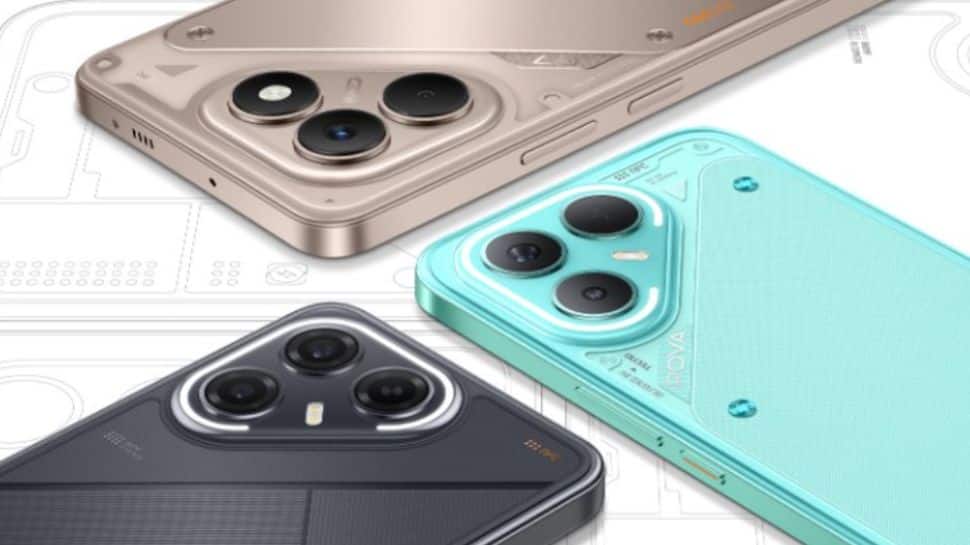
TECNO Pova 7 5G Series Launched In India With Ella AI Chatbot; Check Camera, Battery, Price And Availability | Technology News
TECNO Pova 7 5G Series India Launch: TECNO, a Chinese smartphone manufacturer, has launched the Tecno Pova 7 5G series in India. The series includes Pova 7 5G and Pova 7 Pro 5G smartphones. Both the phones comes with a Delta Light interface, which features 104 Mini LED lights on the back panel. These lights react dynamically to notifications, calls, charging, music, and volume, adding a gamer-style aesthetic to your phone. TECNO Pova 7 5G series runs on the Android 15-based HiOS 5 version and get Ella AI chatbot from the brand which lets you use it in multiple Indian languages. The Tecno Pova 7 5G is offered in Magic Silver, Oasis Green and Geek Black colour options. Meanwhile, the Tecno Pova 7 5G Pro comes in Dyanmic Grey, Neon Cyan and Geek Black colour options. TECNO Pova 7 5G Specifications The device features a 6.78-inch Full HD+ LCD display with a smooth 144Hz refresh rate and peak brightness of up to 900 nits in High Brightness Mode (HBM). It is powered by the MediaTek Dimensity 7300 Ultimate processor, paired with up to 8GB of LPDDR4x RAM and UFS 2.2 storage. For photography, the phone sports a dual rear camera setup with a 50MP primary sensor and a secondary sensor, while a 13MP front camera handles selfies and video calls. Backed by a massive 6,000mAh battery, the device supports 45W wired fast charging but lacks wireless charging support. TECNO Pova 7 5G Pro Specifications The smartphone comes with a 6.78-inch 1.5K AMOLED display offering a 144Hz refresh rate and an impressive peak brightness of 4,500 nits. It features Corning’s Gorilla Glass 7i protection on top and carries an IP64 rating for water and splash resistance. The phone is powered by a MediaTek Dimensity 7300 Ultimate processor. On the photography front, it includes a 64MP primary camera and an 8MP ultra-wide angle lens, both supporting 4K video recording at 30fps. On the front, there’s a 13MP selfie camera that can also record videos in 4K at 30fps. The handset is backed by a large 6,000mAh battery with support for 45W wired fast charging and 30W wired fast charging, ensuring quick top-ups. TECNO Pova 7 5G Series India Price And Availability The Tecno Pova 7 is priced at Rs 14,999 for the 8GB RAM and 128GB storage variant, while the 8GB RAM and 256GB storage variant is available for Rs 15,999. On the other hand, the Pova 7 Pro is priced at Rs 18,999 for the 8GB RAM and 128GB storage model, and Rs 19,999 for the 8GB RAM and 256GB storage option. Consumers can purchase smartphones from July 10 on Flipkart. TECNO Pova 7 5G Series: Alternative Options Other smartphones priced under Rs 20,000 include the OnePlus Nord CE 4 Lite, Oppo K13, Realme P3, and CMF Phone 2 Pro, offering consumers a range of affordable options in the mid-budget segment.
How To Read Deleted WhatsApp Messages On Android And iOS For Free; Follow THESE Steps
Read Deleted WhatsApp Messages: In today’s fast-paced digital world, Meta-owned WhatsApp has become an essential tool for staying connected. This instant messaging platform lets users chat with anyone, anywhere, in real time—at no extra cost, as long as there is a stable internet connection. But while WhatsApp makes communication easy, it also comes with its little frustrations. Have you ever seen a message notification pop up, only for it to be deleted before you could read it? You’re not alone. Curiosity kicks in, and you’re left wondering what it said. Fortunately, there are simple tricks and apps that can help both Android and iOS users view or read deleted messages using features like notification history, chat backups, third-party apps, and more. In this article, we’ll walk you through safe and easy ways to recover them. So next time, you won’t waste time guessing what was in that deleted message. How To Read Deleted WhatsApp Messages Via WhatsApp Chat Backup Step 1: Open WhatsApp and go to Settings > Chats > Chat Backup. Step 2: Make sure the backup frequency is set to daily or a suitable interval. Step 3: Uninstall WhatsApp from your device using the phone’s settings. Step 4: Reinstall WhatsApp from the Google Play Store (or App Store for iPhone users). Step 5: Open the app, verify your phone number, and tap “Restore” when prompted to recover chats from your backup. How To Read Deleted WhatsApp Messages via WhatsApp iCloud Backup Step 1: Open WhatsApp and go to Settings > Chats > Chat Backup. Step 2: Check the date and time of the last backup to make sure it includes the deleted messages. Step 3: Delete the WhatsApp app by pressing and holding the icon, then tapping Delete App. Step 4: Reinstall WhatsApp from the App Store. Step 5: Open WhatsApp, verify your phone number, and follow the on-screen prompts to restore chats from iCloud.
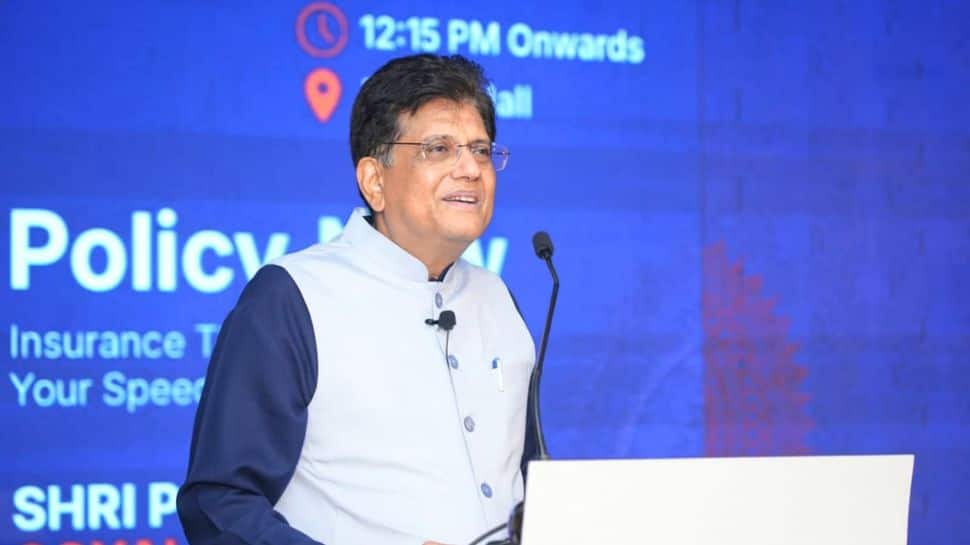
India Leading Global Tech Race With Cost-Effective Innovation: Piyush Goyal | Technology News
New Delhi: Union Commerce and Industry Minister Piyush Goyal said on Saturday that India is emerging as a global leader in technology and innovation, driven by its young population, cost-effective R&D ecosystem, and forward-looking policies. He asserted that India’s embrace of technologies like artificial intelligence, machine learning, quantum computing, and data analytics is helping the country move up the global growth chart. In a video message shared on the social media platform X, Goyal highlighted that India’s innovation costs are significantly lower than those in Western economies. “When we work on new technologies in India, our cost is nearly one-sixth or one-seventh of what it would be in Switzerland or Europe or America,” he said. He pointed out that with a $12 billion investment in innovation, India can effectively generate outcomes worth $100 billion — the equivalent cost in developed nations. Minister @PiyushGoyal delivered the keynote address at the @IITMadras Alumni Association event, Sangam 2025, in Bengaluru. He spoke about how making a future-ready India is at the centre of various policy initiatives of the Modi government, which is driving innovation and growth… pic.twitter.com/BzMu2tHymE — Piyush Goyal Office (@PiyushGoyalOffc) July 5, 2025 “And when we roll that money over three or four cycles, you can imagine the scale of support this fund can provide to our innovation ecosystem,” Goyal added while speaking at the IIT Madras Alumni Association’s Sangam 2025 event. The minister said that India is transforming from a job-seeking nation to one of job creators, thanks to its thriving startup and research landscape. “Our science and technology, combined with our startup ecosystem and R&D efforts, are writing the India growth story of the future,” he said. Goyal credited the youth of the country for driving this transformation, stating that India’s young population is leading innovation, research, and technology adoption across sectors and government programmes. He further emphasised that India does not shy away from adopting new technologies, and instead views them as essential to economic growth. “They are being absorbed in our manufacturing, services, and business sectors, helping India become the fastest-growing large economy in the world,” the minister said. “This tech-driven approach is helping India buck the global slowdown trend and expand its presence in international trade and innovation leadership,” the Union Minister mentioned.

Google Gmail’s New Feature: How To Read, Send, And Compose Emails Without Internet – Follow Step-by-Step Guide | Technology News
Google Gmail Offline Feature: Google’s Gmail remains one of the world’s most widely used email platforms, with over 1.8 billion users are using it for both professional and personal communication. Gmail also offers a range of features tailored for workplace and academic use. But what happens when you’re in a remote area with little or no internet access and need to send an urgent email? Until now, that would’ve been a major hurdle. Fortunately, Google has introduced a new Gmail’s handy offline feature that solves this problem. With this Gmail’s new feature, users can now access their Gmail account, read messages, respond to emails, access your inbox, compose new messages and even perform searches—all without an active internet connection. This enhancement is especially useful for those working or studying in low-connectivity zones. Here’s how you can enable and use Gmail offline feature in seconds How To Enable Offline Mail Step 1: Visit gmail.com using the Google Chrome browser (this feature doesn’t work on other browsers). Step 2: Click the gear icon in the top right corner, then select “See all settings.” Step 3: Click on the “Offline” tab from the settings menu. Step 4: Check the box that says “Enable offline mail.” Choose how many days of emails (up to 90 days) you want available offline. Step 5: Decide whether Gmail should keep or remove offline data when you log out. Finally, click “Save Changes.” How To Access Gmail Offline Step 1: Go to mail.google.com using the Chrome browser—even without an internet connection. Step 2: A message will appear confirming that you’re now in offline mode. Step 3: You can browse your inbox and read previously synced emails. Step 4: Create new emails that will be saved as drafts and automatically sent once you’re back online.
WhatsApp Blue Tick Verification Badge: How Android And iOS Users Can Apply; Check Eligibility, Cost | Technology News
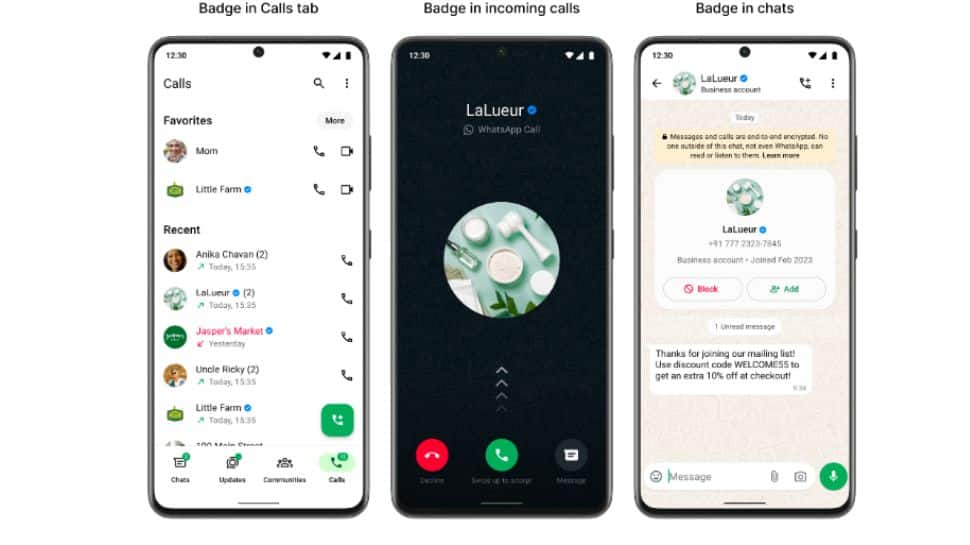
WhatsApp Blue Tick Verification Badge: Are you wondering how to get a blue tick on WhatsApp? Just like Instagram, Facebook, and X, WhatsApp also offers a verified blue tick—but it’s exclusive to business accounts. This badge appears as a blue mark next to the business name on WhatsApp. It helps users identify authentic businesses, building trust and credibility. If you run a business and want that mark of authenticity, there’s a clear process to follow through the WhatsApp Business app and a Meta Verified subscription. In this article, we will tell you which accounts are eligible, where the tick appears, and how to apply for the WhatsApp blue tick verification badge. Who Can Get WhatsApp Blue Tick Verification Badge? Before diving into the process of getting a blue tick on WhatsApp, it’s crucial to first understand who qualifies for it. The blue tick is available only for business accounts. This verified badge adds credibility to a business profile, giving customers greater confidence when interacting with the business on WhatsApp. It indicates that the account has been officially verified by Meta, based on its activity and the documents submitted for authentication. Meanwhile, Meta Verified is a paid monthly subscription that comes with several features such as a verified badge, account support, and account protection. Where Is Blue Tick Verified Badge Displayed? The Meta Verified badge, which appears as a sticker with a checkmark, helps users easily identify verified businesses on WhatsApp. Once a business is verified, this badge becomes visible in several places within the app, including the Calls tab, business profiles, context cards, chats, and during incoming calls from verified businesses. This consistent visibility reinforces the authenticity of the business across different touchpoints on WhatsApp. How Android and iOS Users Can Apply for the WhatsApp Blue Tick? Step 1: Open the WhatsApp Business app on your Android or iOS device. Step 2: Navigate to Settings. Tap the three dots at the top right and select Settings For Android users. Tap the Settings tab at the bottom right for iOS users. Step 3: Go to Tools in the Settings menu. Step 4: Tap on “Meta Verified” to access verification options. Step 5: Select a subscription package of your choice and complete the payment to get verified. WhatsApp Blue Tick Verification Badge Cost According to the Media reports, the cost of the blue tick ranges from Rs 639 to Rs 18,900, depending on the selected package, as WhatsApp Business offers multiple subscription plans for verification under the Meta Verified program.
Securing FastAPI Endpoints for MLOps: An Authentication Guide
In today’s AI world, data scientists are not just focused on training and optimizing machine learning models.
Madras HC Dismisses Xiaomi’s Petition Against ED Proceedings In FEMA Violation Case | Technology News
Chennai: The Madras High Court has dismissed the petitions filed by Xiaomi Technology India Pvt Ltd and its Chief Financial Officer Sameer B.S. Rao, seeking to quash the proceedings initiated by the Enforcement Directorate (ED) in connection with alleged violations under the Foreign Exchange Management Act (FEMA) involving royalty payments of Rs 5,551 crore. Justice N. Anand Venkatesh, delivering the verdict recently, held that the court would not interfere at the “formation of opinion” stage of proceedings under FEMA adjudication rules, as it was only a preliminary step and not a final determination of liability. Xiaomi India is engaged in the procurement, distribution, and sale of Xiaomi-branded products across India. In this context, the company entered into royalty agreements with Qualcomm Incorporated, Qualcomm Technologies Inc. (both US-based entities), and Beijing Xiaomi Mobile Software Co. Ltd, a group company based in China. According to the ED, Xiaomi remitted Rs 5,551 crore between 2016 and 2022 to these foreign entities as royalty payments, allegedly without obtaining prior approval from the Reserve Bank of India (RBI) — a requirement under FEMA for certain types of foreign remittances, especially where third-party transactions are involved. Following its investigation, the ED filed a complaint, and a show-cause notice was issued by the Adjudicating Authority under FEMA, which Xiaomi challenged before the High Court in April 2024. Appearing for Xiaomi, senior advocate K.G. Raghavan contended that the royalty payments were legitimate current account transactions and therefore did not require the RBI’s prior approval. He argued that the ED’s initiation of adjudication proceedings was unwarranted. However, Additional Solicitor General L. Sundaresan, representing the ED, submitted that the writ petition was premature, as the adjudication process was still at the stage of forming an opinion. He argued that this stage only requires prima facie material suggesting a contravention of FEMA provisions, and need not be based on conclusive findings. Sundaresan also cited a communication from Qualcomm, wherein Xiaomi was referred to as a “third party” remitting payments on behalf of foreign group entities — an act which, according to the ED, constitutes a violation under the FEMA. Accepting the ED’s submissions, the High Court held that interference at this stage was unwarranted and permitted the adjudication proceedings to continue. Consequently, Xiaomi’s plea challenging the show-cause notice and the formation of opinion was dismissed. “In the considered view of this Court, the case has now reached the stage under Rule 4(4) of the FEMA Rules, which is the stage of defence and therefore, the petitioners will be entitled to all the documents sought by them, including the non-RUDs,” the court said in its judgement delivered on June 26.
5 Advanced RAG Architectures Beyond Traditional Methods
Retrieval-augmented generation (RAG) has shaken up the world of language models by combining the best of two worlds: <a href="https://www.
How Lens Fungus Destroys Camera From Within – And What You Can Do About It | Gadgets News
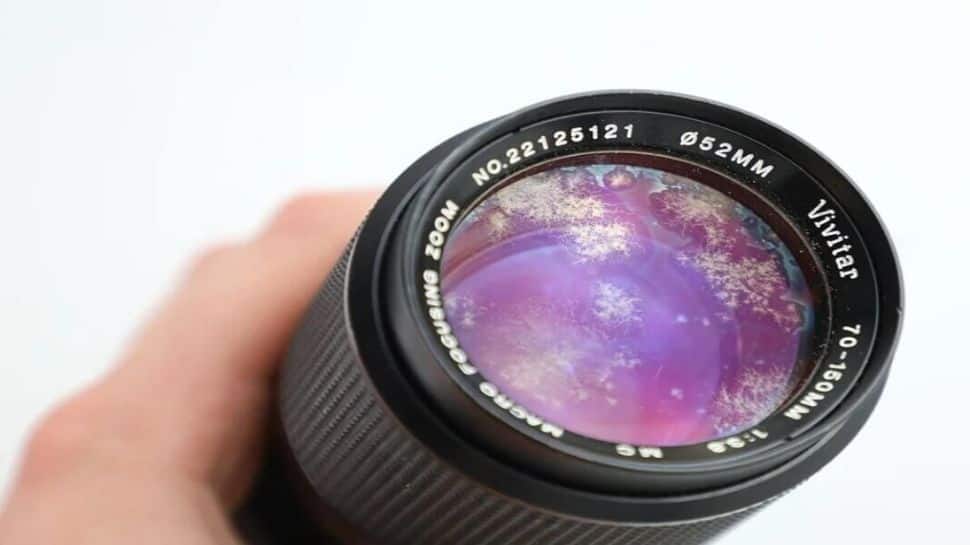
New Delhi: A forgotten lens in a dark drawer. A whiff of humidity. That is all it takes. Days pass. Then weeks. Eventually, beneath the glass, something stirs. Threads. Webs. A delicate frost. And with it, the death of a lens begins. Lens fungus does not knock before entering. It finds the smallest crack in your routine, settles quietly inside the lens barrel and then feeds on oil, dust and even breath. Many photographers first notice it as a ghostly haze. Others, only when contrast fades, colors die and resale value drops like a stone. The real danger is not what you see. It is what you do not. These fungal spores are everywhere – in your home, your bag and your hands. They wait for moisture. Then they wake. And when they do, they do not only stay on one lens. They move by touch, by cloth and by carelessness. A full outbreak is only one bad habit away. Inside the lens, the damage begins quietly. Some fungi secrete acid. Coatings dissolve. Glass pits. The etching never heals. Even after a cleaning, the scars remain. Sharpness drops. The glow of backlight blooms where it should not. Every frame tells the story of a dying lens. Vintage lenses suffer more. They are old. Less sealed. Less defended. Yet modern lenses are not immune. A few weeks in a humid attic or sealed bag is all it takes. That is why pros open every lens once a month. They let them breathe. They let in light. They keep fungus afraid. Still, the myths linger. “It is just cosmetic.” “It is only on the edge.” But tests say otherwise. Once fungus crosses 20% of a lens surface, image degradation becomes measurable. Blacks go gray. Textures fade. Details vanish. Sometimes permanently. Fungus does not spread like a virus. But it thrives when photographers get lazy. One infected lens in a damp box can turn into five. Add neglect to the mix, and no dry box in the world can save you. The fix? Prevention. Use your lenses. Store them in dry cabinets. Let them see light. Keep them clean. Desiccant caps help. So does caution. If you see fungus, quarantine the lens. Treat it like a biohazard. Gloves. Flashlight. UV exposure. And if damage is deep, call a professional. Some fungi lie between glued elements. Some feed inside layers of optical cement. Once they reach that deep, DIY does not work. And repair costs often exceed the price of a new lens. Especially for zooms and rare glass. For beginners, one rule matters most – moisture kills optics. Always. If you are in the tropics, watch your humidity. Use silica. Use sealed boxes. Use common sense. Because the worst part of lens fungus is not what it destroys. It is when you realize the photos you missed because of it. The shot that went soft. The moment that never came back. Treat your gear like a living thing. It breathes. It decays. And if you ignore it long enough, it dies. Quietly. Silently. Just like fungus grows.